What you will learn
- How to break work into atomic mini-prompts processed through a queue for retry granularity and rate limit resilience
- The event-driven trigger patterns (cron, webhooks, CI/CD) that turn Claude Code into unattended infrastructure
- Quality gate strategies that replace human reviewers for banned word detection, structural validation, and timeout management
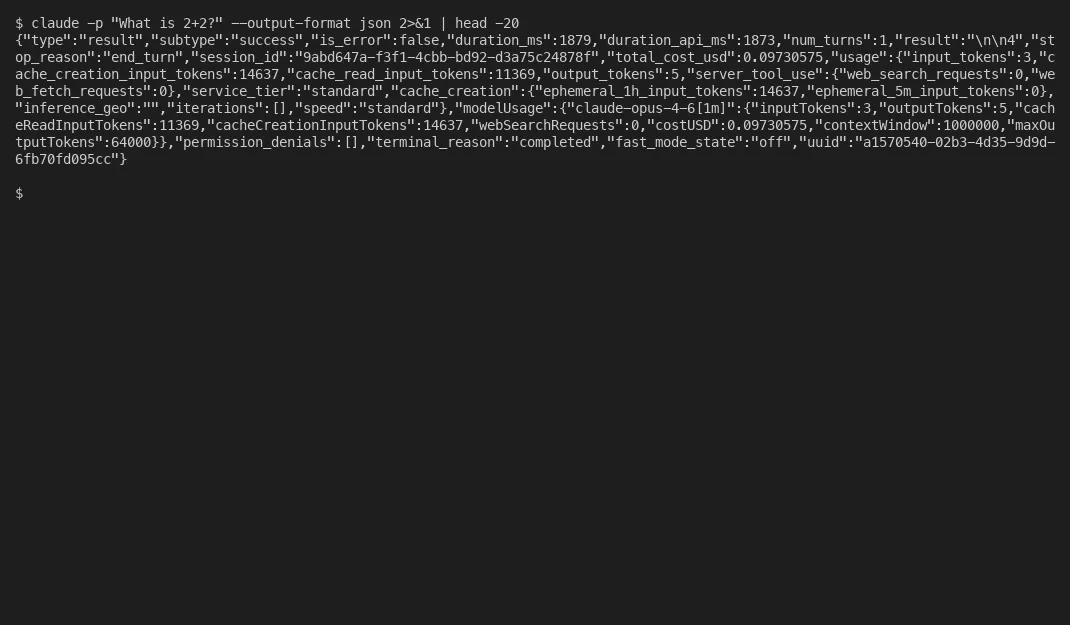
The -p flag turns Claude Code into something most people don’t think about. Not an assistant you talk to, but a worker you dispatch. Write a prompt, pipe it in, Claude executes without a terminal, without interaction, without you watching. Then it exits.
Sounds simple. It is simple. But the gap between running a single claude -p command and having dozens of automated jobs fire every few minutes across multiple repos. That’s where every tutorial falls short.
Most articles cover the basics and stop. Here’s the -p flag, here’s --dangerously-skip-permissions, here’s a GitHub Action. What they skip is what happens at scale. How do you handle rate limits when you’re processing 50 tasks per hour? How do you prevent quality from degrading when nobody’s reviewing output? How do you structure prompts so that one failure doesn’t bring down the queue?
I run a production system that processes work from CRM queues, support systems, and API monitoring, firing every few minutes, spawning parallel agents, processing whatever arrived since the last run. Building it taught me patterns I haven’t found documented elsewhere.
Plan mode and the shift to non-interactive prompts
Start with plan mode if you haven’t already. It’s probably the fastest way to understand why structured prompting matters for automation.
Plan mode puts Claude into a read-only exploration phase. Toggle it with Shift+Tab twice in the interactive terminal, or start with claude --permission-mode plan. Claude can read files, search the codebase, and think through approaches, but it can’t modify anything. It writes a plan, you review it, and only after you approve does execution begin.
Armin Ronacher wrote an interesting breakdown of plan mode showing it relies primarily on prompt engineering rather than hard technical enforcement. Custom prompts that give structure, system reminders, and examples. That’s the important point. The value isn’t in the tooling restriction, it’s in the thinking structure.
Boris Tane describes a three-phase workflow built around the same idea: research deeply, generate a plan in a persistent markdown file, annotate and iterate on that plan until satisfied, then execute. He iterates on plans 1-6 times before greenlighting execution.
“Never let Claude write code until you’ve reviewed and approved a written plan.” — Boris Tane, boristane.com
Here’s the problem. Does plan mode work for automation? No. Plan mode needs a human at the keyboard. Someone has to review the plan and approve it. Fine when you’re sitting at your terminal working through a feature. It falls apart when you want Claude running on a schedule, triggered by a webhook, or executing inside a CI pipeline at 3 AM.
The -p flag bridges that gap. The headless mode documentation covers it well: you send a prompt, get a response, and the process exits. The critical flags:
--output-format jsongives you structured output with asession_idfor chaining--max-turns Nprevents runaway exploration loops (5-10 is usually plenty)--allowedTools "Bash,Read,Edit"restricts what Claude can touch--json-schema '{...}'validates output against a schema--resume SESSION_IDcontinues a specific conversation context--max-budget-usd 5.00caps spend per execution
(June 2026 note: the economics of running this at volume changed. From June 15, 2026, Agent SDK and claude -p usage stops counting against your Claude plan limits and draws on a separate monthly Agent SDK credit instead, with overflow billing at standard API rates. The queue and backoff discipline below still matters, but plan if your automation will outrun that monthly credit.)
The mental model shift takes time to internalize. Interactive Claude Code is a conversation partner. Non-interactive Claude Code is a function. Actually, that oversimplifies it. You define the input, constrain the execution, validate the output. Same brain, totally different relationship.
The way I think about it now is a two-phase pattern. Instead of one Claude call that plans and executes, you make two:
# Phase 1: Generate the plan (read-only thinking)
plan=$(claude -p "Analyze the following task and produce a detailed plan. \
Do NOT make any changes. Only output your analysis and proposed approach. \
Task: ${TASK_DESCRIPTION}" \
 --output-format json 2>/dev/null | jq -r '.result')

# Phase 2: Execute the plan
claude -p "Execute the following plan exactly as specified: \
 ${plan}" \
 --allowedTools "Bash,Read,Edit"
Phase 1 thinks. Phase 2 acts. If Phase 1 produces a bad plan, you catch it before any files change. If Phase 2 fails mid-execution, you still have the plan to retry from. That retry granularity alone makes the extra API call worth it.
You can also chain them through session continuity instead of passing the plan as text:
session_id=$(claude -p "Plan: ${task}" --output-format json | jq -r '.session_id')
claude -p "Execute the plan" --resume "$session_id" --allowedTools "Bash,Read,Edit"
Same thinking discipline as plan mode. No human required. I covered how plan mode shapes broader project workflows. The two-phase pattern here is the non-interactive version of that same approach.
The mini-prompt pattern
The thing is, one massive prompt that tries to do everything is fragile. Context overflows, Claude starts hallucinating details from earlier in the prompt, and when it fails, you retry the entire thing from scratch. Rate limits compound this. A single complex prompt that burns through your quota wastes everything it already computed.

Mini-prompts fix this by breaking work into small, atomic units. Each prompt file is self-contained. It has all the context it needs, does one thing, and produces a checkpointable result.
The queue architecture looks like this:
/project/
TO-DO/ # Pending prompt files
DONE/ # Completed prompt files (moved, not deleted)
RETRY/ # Failed prompts awaiting retry
logs/ # Execution logs per prompt
results/ # Output files
Prompt files are numbered for sequential processing: 001_categorize.prompt, 002_extract.prompt, 003_generate.prompt. Each file contains the complete prompt text plus any context Claude needs. Treat these prompt files like code. They deserve version control and testing just like any other production asset. The processor picks them up in order, runs the two-phase pattern, and moves completed files to DONE.
Here’s a Python queue processor that handles real-world complexities:
import subprocess, json, os, time
from pathlib import Path

BACKOFF_SCHEDULE = [30, 60, 300, 900, 1800, 3600, 7200]

def _get_clean_env():
 """Remove Claude-specific env vars to prevent nested session conflicts."""
env = os.environ.copy()
for key in list(env.keys()):
if 'CLAUDE' in key.upper():
env.pop(key, None)
return env

def process_queue(todo_dir, done_dir, retry_dir, logs_dir):
for prompt_file in sorted(Path(todo_dir).glob("*.prompt")):
try:
prompt_content = prompt_file.read_text()
result = subprocess.run(
 ['claude', '-p', prompt_content,
 '--output-format', 'json', '--max-turns', '10'],
capture_output=True, text=True, timeout=120,
env=_get_clean_env()
 )
output = json.loads(result.stdout)

 # Log and move to done
log_path = Path(logs_dir) / f"{prompt_file.stem}.log"
log_path.write_text(json.dumps(output, indent=2))
prompt_file.rename(Path(done_dir) / prompt_file.name)

except subprocess.TimeoutExpired:
prompt_file.rename(Path(retry_dir) / prompt_file.name)
except Exception as e:
if 'rate limit' in str(e).lower() or '429' in str(e):
handle_rate_limit(attempt=0)
prompt_file.rename(Path(retry_dir) / prompt_file.name)

def handle_rate_limit(attempt):
delay = BACKOFF_SCHEDULE[min(attempt, len(BACKOFF_SCHEDULE) - 1)]
time.sleep(delay)
The _get_clean_env() function is worth calling out. When Claude Code spawns as a subprocess from another process that was itself started by Claude Code, environment variables leak. The nested instance picks up the parent’s session context and behaves unpredictably. Cleaning the environment before spawning cost me a painful day of debugging to figure out. Don’t skip it.
Two-phase evaluation makes the queue smarter. Fast classification runs with a 30-second timeout, just categorizing or triaging. Deep analysis runs with 120 seconds. Different task types get different resource budgets. Sounds obvious, but almost nobody does this. A simple triage task that hangs for two minutes wastes capacity that three other tasks could have used.
Turns out, sustainable throughput is lower than you’d expect. I think most people assume they can push complex work through indefinitely. Can you? No. Complex tasks involving reading multiple files and producing structured output: 30-50 per hour. Simple classification or triage: 100-150 per hour. Push harder and rate limits start eating your backoff time, dropping effective throughput even further. Start conservative. Process 10-20 items, check the results, then scale up.
If you want to skip the trial-and-error and get to working, Blue Sheen runs these engagements.
Triggers that run without you
Interactive Claude Code is brilliant. But it needs you sitting there.
Non-interactive Claude Code is the same brain, triggered by anything.
Cron scheduling is the simplest trigger and the one I use most. A production system I maintain checks for pending work every few minutes:
# Check for work and process it
*/4 * * * * /usr/bin/python3 /path/to/task_processor.py >> /var/log/processor.log 2>&1
Short intervals with idempotent processing. If nothing’s pending, the script exits in under a second. If work landed, it processes one task per cycle to stay within rate limits. This has been running for months. Don’t try to process everything at once. Process one thing reliably, then let the next cron tick handle the next thing. Running automation on individual machines creates a code governance problem that IT can’t see, so centralizing where these scheduled jobs execute matters more than most teams realize. Claude Code also has native scheduling tiers now, which handle the timing without a cron wrapper at all.
Webhook triggers work well for event-driven work. Support ticket arrives, webhook fires, Claude analyzes the ticket and drafts a response. PR gets opened, webhook fires, Claude reviews the diff. The two-phase pattern fits naturally here. Phase 1 classifies and plans, Phase 2 generates the response.
CI/CD pipelines give you automated code review and maintenance. The claude-code-action GitHub Action supports schedule triggers with cron syntax:
on:
schedule:
  - cron: '0 6 * * 1' # Every Monday at 6 AM
pull_request:
types: [opened, synchronize]

jobs:
review:
runs-on: ubuntu-latest
steps:
  - uses: anthropics/claude-code-action@v1
with:
prompt: 'Review this PR for security issues and code quality.'
The community keeps building scheduling tools around these patterns. Automated Claude Code workers describes a full MCP-server-based task queue architecture with status tracking and structured routing.
For my own system: 8 parallel agents per run cycle, processing work from CRM queues, support systems, and monitoring. Each agent handles one task type with its own prompt template. The parallel architecture pushes reliability to roughly 95%. If one agent hits a rate limit or produces bad output, the others keep going. This works because the agents are independent. They don’t communicate with each other, which avoids the orchestration complexity trap where coordination overhead grows exponentially.
A single-agent sequential approach was sitting around 60% reliability before I made the switch. The difference is all about fault isolation.
One thing hooks solve elegantly: if you want something to happen every time Claude finishes a task (logging, notifications, cleanup), hooks fire deterministically. They’re shell commands that execute at specific lifecycle points: PostToolUse, Stop, Notification. Unlike prompt-based instructions, hooks don’t depend on Claude remembering to do something. They just run. I wrote a detailed guide on how hooks work including the pitfalls that will waste your afternoon if you don’t know about them.
What breaks and how to fix it
Running Claude Code unattended introduces failure modes that don’t exist in interactive use. Output quality degrades and nobody notices until damage is done. This is the silent failure pattern that affects all production LLM systems. Your automation can be “up” while producing garbage.
A bigger version of this shows up on jobs that run for days, where the agent drifts and then reports it is finished when it is not. I wrote about keeping a long autonomous job on track, with a git ledger and a two-pass check built to catch exactly that.
I learned this the hard way. An automated system was generating content that technically fulfilled every requirement but included phrases that sounded robotic and formulaic. Nobody caught it for days because the output “worked.” Frustrating to discover after the fact. That experience led directly to multi-layered quality gates.
Banned word and phrase detection is the first layer:
BANNED_WORDS = ['utilize', 'leverage', 'robust', 'seamless',
 'crucial', 'delve', 'tapestry', 'multifaceted']

BANNED_PHRASES = [
r'(?i)looking forward to',
r'(?i)please do not hesitate',
r'(?i)hope this finds you',
]

def check_quality(output_text):
violations = []
for word in BANNED_WORDS:
if word.lower() in output_text.lower():
violations.append(f"Banned word: {word}")
for pattern in BANNED_PHRASES:
if re.search(pattern, output_text):
violations.append(f"Banned phrase: {pattern}")
return violations
Check every piece of output against these lists. If violations are found, retry with explicit instructions to avoid those specific words. This sounds crude. It catches the most common failure mode of unattended AI output.
Meta-response detection catches a subtler failure. Claude sometimes outputs commentary about the task instead of doing the task. “I would be happy to help with that…” or “Here is my analysis of…” when you wanted the analysis itself, not a cover letter. Check for these markers and retry when found.
Parallel execution with variant selection is where this gets powerful:
from concurrent.futures import ThreadPoolExecutor, as_completed

with ThreadPoolExecutor(max_workers=8) as executor:
futures = {
executor.submit(generate_variant, n, context): n
for n in range(8)
 }
results = []
for future in as_completed(futures):
variant_id, output, violations = future.result()
if not violations:
results.append((variant_id, output))
Eight agents, each producing a variant. Variants with quality violations get discarded. The best clean variant gets used. If none pass, the system retries the failing variants with violation-avoidance instructions injected into the prompt. This two-pass approach (parallel generate, then sequential fix) handles the long tail of quality issues without burning through your rate limit on retries.
Auto-restart wrappers handle the infrastructure layer. A simple run_forever.sh pattern:
#!/bin/bash
consecutive_failures=0
while true; do
python3 /path/to/processor.py
exit_code=$?

if [ $exit_code -eq 0 ]; then
consecutive_failures=0
sleep 30
elif echo "$exit_code" | grep -q "rate"; then
echo "Rate limited, sleeping 2 hours"
sleep 7200
consecutive_failures=0
else
consecutive_failures=$((consecutive_failures + 1))
if [ $consecutive_failures -ge 5 ]; then
echo "5 consecutive failures, sleeping 1 hour"
sleep 3600
consecutive_failures=0
else
sleep 60
fi
fi
done
On rate limits, sleep long. On errors, back off gradually. Track consecutive failures and escalate the sleep duration. This wrapper has kept systems running for weeks without intervention.
Security deserves its own mention. The --dangerously-skip-permissions flag is convenient but dangerous. In production, prefer --allowedTools to whitelist exactly what Claude can touch. Running in a container or VM adds another layer. The SFEIR Institute’s CI/CD tutorial recommends restricting tools to the strict minimum in automated contexts. Good advice.
The “test on 20 items first” rule saves more grief than any code pattern. Before scaling any new prompt to full production, process 20 items and manually review every output. You’ll catch prompt issues, quality problems, and edge cases that no automated gate would find. As I wrote about with building reliable AI agents, boring engineering discipline beats brilliant but fragile systems every time.
Picking the right approach
Not everything needs a custom queue processor. Here’s how the different automation approaches compare:
| Approach | Best for | Complexity | When to use |
|---|---|---|---|
-p flag scripting | Batch processing, scheduled jobs | Low | You need custom queue logic or complex prompt composition |
| Hooks | Auto-formatting, validation, notifications | Low | You want deterministic actions at lifecycle events |
| GitHub Actions | PR review, CI/CD, team workflows | Medium | Your automation lives in the GitHub environment |
| Cron + scripts | Scheduled audits, monitoring, recurring analysis | Medium | You want full control over scheduling and retry logic |
| Agent SDK | Programmatic control, custom UIs, orchestration | High | You’re building a product or complex multi-agent system |
A cron job calling claude -p with a well-structured prompt handles more use cases than people expect. Move to the Agent SDK when you need programmatic control over the agent loop itself: spawning subagents, managing context compaction, building custom tool integrations. The extra complexity is rarely worth it before you’ve tested a simpler version.
A June 2026 row for that table: dynamic workflows now cover a chunk of what previously required the Agent SDK. Ask for one in a prompt, or run with the ultracode setting on, and Claude writes the orchestration script itself, fanning out to parallel subagents in the background; it works under claude -p too. Mind the unattended case, though. Headless runs start without any launch prompt, and workflow subagents execute with file edits auto-approved, so the quality gates this post keeps banging on about are not optional decoration. At fan-out scale, they are the only reviewer left.
If the recurring work isn’t code and you would rather not maintain a terminal pipeline at all, Cowork runs scheduled tasks from the Claude desktop app instead.
Plenty of agentic AI projects get canceled before they ever reach production, and the cause is usually unanticipated complexity rather than a bad core idea. The difference between the projects that survive and the ones that get canceled? Usually it’s exactly this kind of boring operational discipline: quality gates, retry logic, timeout management, proper task orchestration, queue-based processing.
Non-interactive Claude Code isn’t a hack or a workaround. It’s the intended path to building real AI automation. The gap between “AI assistant” and “AI infrastructure” is just a -p flag, good prompt architecture, and the production hardening that comes from treating AI operations like actual operations.
Queue management, quality gates, retry logic. That’s the product.