Key takeaways
- Cowork handles the 80% that isn't code - Documents, research, CRM, communication, data analysis. Claude Code handles the technical infrastructure. Together they cover an entire project lifecycle.
- Plan mode forces structured thinking before any action - Read-only exploration means you can't accidentally change anything. The discipline this creates compounds across every session.
- CLAUDE.md is your persistent project brain - Stakeholder profiles, decision logs, billing rules, and mandatory behaviors all live in one file that Claude reads at every session start.
- Subagents turn one person into a parallel team - Up to 20 concurrent agents handle research, meeting prep, and deliverable generation at the same time with dependency tracking.
I run entire consulting engagements through Claude. Not coding tasks. Full projects with 20+ stakeholders, meeting pipelines, deliverable tracking, CRM integration, and billing automation. Most people ask Claude to write emails. I ask it to run my business.
The gap between “using Claude” and “running projects with Claude” is enormous. It’s the difference between having a calculator and having a finance team. And with the launch of Cowork, the non-developer side of this equation finally has proper tooling.
The problem with how most people use Claude
Everyone fixates on Claude Code. It’s a terminal-based agentic coding environment that runs for hours on complex tasks. Spotify has used it for about 50 migrations, with most of the resulting pull requests merging into production.
But code is maybe 20% of any real project. Can Claude Code handle the other 80%? Not alone.
The other 80% - stakeholder communication, research synthesis, document creation, data analysis, meeting prep, CRM updates - that’s what Cowork handles. Anthropic’s pitch for Cowork is telling: it wants to be Claude Code for the rest of your work. It runs inside the Claude desktop app with direct access to your local folders on macOS and Windows, and connects to a growing list of external services through MCP connectors. The mental shift matters. Stop thinking “AI chat tool.” Start thinking “AI project team member.”
Cowork is available on the paid plans, which means the barrier to entry isn’t a six-figure enterprise contract. It’s a no-brainer monthly subscription that any consultant or small team can justify.
In my consulting practice, Claude handles: building stakeholder profiles from LinkedIn and CRM data, prepping meeting agendas from past notes and recent emails, tracking deliverables across multiple workstreams, calculating billing with tiered rate logic, updating project dashboards after every interaction, and flagging when deadlines approach. The Claude for developers angle gets all the attention. The non-code project work is where most hours actually go.
Here’s a concrete example. A multi-site company going through rapid growth needed an AI governance framework. The messy non-code work dwarfed the technical work. Stakeholder interviews across regional leaders. Communication plans tailored to different audience levels. Research into compliance frameworks across multiple jurisdictions. Deliverable tracking for a dozen-plus documents with staggered deadlines. Weekly status dashboards for the executive sponsors.
Cowork handled all of it - connected to Google Drive for document management, Gmail for stakeholder communication tracking, and the CRM for contact data and meeting history. Claude Code handled the automation layer underneath: the scripts, the data conversions, the structured templates. Neither tool alone would have covered the engagement.
Together, they replaced what would have been a project coordinator role. Not bad for a monthly subscription.
Plan mode stops you from winging it
The single most underrated feature in Claude Code is plan mode. Hit Shift+Tab twice. Straightaway, Claude switches to read-only exploration - it can analyze everything, reason about anything, but it can’t change a single file.
The 4-phase workflow this enables - Explore, Plan, Implement, Commit - changes how you approach complex work. Most people jump straight to asking Claude to do things. Write this. Build that. Fix this bug. Plan mode forces a different discipline. You explore first. You map the territory. You identify dependencies and risks. Then you act. But the real challenge isn’t creating the plan - it’s ensuring Claude actually follows through on every step. Mukesh Murugan’s community benchmark showed tasks taking 35+ minutes with trial-and-error dropping to about 12 minutes when properly planned.
I used this pattern on an AI governance rollout across multiple regional offices. Plan mode explored the existing technology stack across all sites, mapped stakeholder communication preferences for every site leader, identified 8 project dependencies that would have derailed the timeline, and produced a phased roadmap before any deliverable was drafted. Three agents ran simultaneously - one researching compliance frameworks, one mapping the organizational structure, one analyzing existing automation. All read-only. No risk.
Ben Newton’s ROADMAP.md pattern gets at a similar idea - persist your plans as markdown so every session starts with full project awareness. For complex consulting work, the ROADMAP.md is just one file in a much larger system.
Turns out, the real point here: plan mode isn’t about being cautious. It’s about being efficient. When you explore a project structure in plan mode, you’re building a mental model that prevents the three most common failure modes: working on the wrong thing, duplicating existing work, and breaking dependencies you didn’t know existed.
I enter plan mode before every new workstream kickoff now. Even for non-code projects. Before drafting a change management communication plan, plan mode explores the existing stakeholder profiles, reviews past meeting notes for context, checks the deliverable tracker for dependencies, and identifies which audiences need which messages. Only after that exploration do I switch to implementation.
The read-only constraint isn’t a limitation. It’s the feature.
If you want to apply this thinking to your firm, Blue Sheen handles work like this.
Your project needs a brain file
CLAUDE.md is a markdown file that Claude reads at every session start. Persistent memory. And for running real projects, it’s everything.
One discipline makes that brain trustworthy: the state of the project is derived from the files, never from what a session thinks it remembers. What is done is what the committed files and the decision log say is done. What runs next is whatever the work is minus what those files already record as finished. A session that died mid-engagement, or a fresh one on another machine, rebuilds the exact picture by reading, not by recall. That is the difference between a brain file you can stake a client deadline on and a chat history you are hoping was right.
The official documentation describes a hierarchy: managed settings at the top, then command line settings, then project local settings, then shared project settings, then user settings. The technical details matter less than what you put in the file.
Here’s what goes into a CLAUDE.md for a real consulting engagement - drawn from anonymized multi-stakeholder projects I run right now:
Engagement overview. Scope boundaries, billing structure, key contract dates, rate tiers. Hourly consulting with tiered pricing that drops above a monthly threshold. Claude needs this to calculate time tracking and flag billing period transitions.
Mandatory behaviors. Not suggestions. Commands. “On every operation, check CRM for new data. Display the status dashboard. Cascade updates to all affected files.” Claude follows these at every session start, automatically.
People quick reference. Twenty-plus stakeholder profiles with roles, communication preferences, last contact dates, and relationship notes. When I say “prep for the meeting with the VP of Operations,” Claude already knows their communication style, their open action items, and what happened in our last three conversations.
Decisions log. Every major decision with date, context, rationale, and who made it. Six months into an engagement, this is invaluable. I think this is actually the most underrated part of the whole setup - the decision trail alone has saved me from repeated conversations and scope creep disputes.
Self-updating rules. “Do not wait to be told. Discover new information and propagate it.” This is the lateral update rule - any new information cascades to ALL affected files. A meeting note updates person profiles, project status, time tracking, and the deliverable tracker at the same time.
The folder structure that supports this:
Client-Project/
CLAUDE.md (master intelligence - 500+ lines)
 00-Company-Profile/ (company research, org structure)
 01-People/ (20+ stakeholder profiles)
 02-Projects/active/ (live workstreams with status)
 02-Projects/backlog/ (future projects scoped)
 03-Meetings/ (chronological, dated notes)
 04-Time-Tracking/ (CSV with rate tier logic)
 05-Research/ (deep-dive analysis docs)
 06-Deliverables/ (tracker + output files)
 07-Templates/ (reusable formats)
 _archive/ (CRM data exports, historical)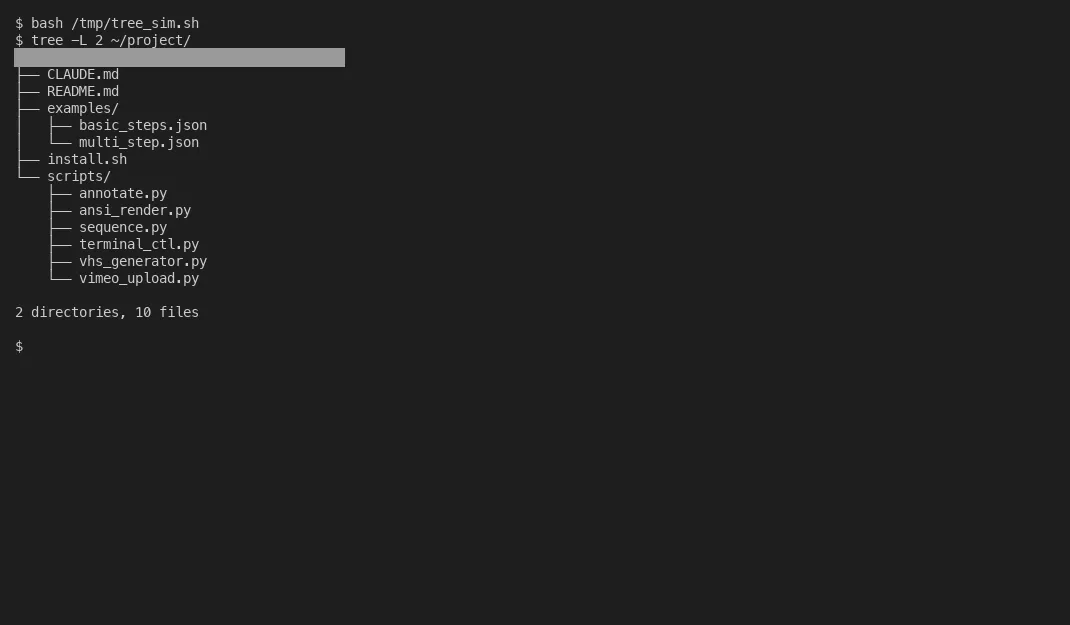
This isn’t theoretical. This is the structure running multiple active consulting engagements right now. The CLAUDE.md alone can exceed 500 lines - stakeholder details, billing rules, project status, mandatory behaviors, CRM integration commands all in one place.
Mind you, the lateral update rule deserves emphasis because it’s the single behavior that makes this work at scale. Without it, you update a meeting note and forget to update the person profile. You log a decision and forget to update the project status. You track time and forget to recalculate the billing period. With the lateral update rule baked into CLAUDE.md, none of that manual bookkeeping exists. Claude does it automatically, every time, without being asked.
The templates folder matters more than people expect. A person profile template ensures every new stakeholder gets documented consistently - role, reporting line, communication preference, decision authority, last contact, open items. A meeting notes template ensures every session gets captured with the same structure. A deliverable template tracks status, owner, due date, audience, and dependencies. Consistency across dozens of files is what makes the system searchable and useful six months later.
Auto-memory adds another layer. Claude writes its own notes across sessions, building institutional knowledge that you never explicitly gave it. Patterns it noticed. Preferences it inferred. Context it accumulated. It might note that a particular stakeholder always pushes back on timeline estimates, or that a certain deliverable format gets better reception from the board. Between the explicit CLAUDE.md and the implicit auto-memory, session 8 of an engagement is radically different from session 1. Does this mean Claude never forgets anything? No. But it forgets less than you will.

Subagents turn one consultant into a team
Subagents are parallel Claude instances that each handle one focused task. Up to 20 running concurrently. Each gets its own context window, its own tool access, its own permissions. They can run in isolated worktrees so there are no file conflicts. File conflicts is the precise scope, and I would keep it that narrow (verified 2026-07-29): a worktree hands each agent its own working directory and index, then leaves the stash stack, the config file and that file’s lock shared across every checkout. Fine until an agent tidies up after itself with git stash, at which point the work can surface in a sibling’s tree instead of its own. What I measured is in what a git worktree does not isolate. (Update, June 2026: subagents can now spawn their own subagents, which they could not when I first wrote this. Revised August 1, 2026: the depth is capped rather than open-ended. v2.1.217 turned nesting off by default and v2.1.219 turned it back on at “depth 3 by default (was 1)”, so a subagent sitting at the limit does not get the Agent tool and cannot branch further. Set CLAUDE_CODE_MAX_SUBAGENT_SPAWN_DEPTH=1 to disable nesting entirely.)
Three built-in agent types cover most needs. Explore agents are fast and read-only, optimized for searching and understanding. Plan agents handle read-only analysis for designing approaches. General-purpose agents get full capabilities for complex multi-step work.
You can also define custom agents as markdown files in .claude/agents/ with specific system prompts and tool restrictions. A “CRM updater” agent that can only access your CRM API. A “meeting prep” agent with read-only access to your notes folder. A “billing calculator” agent that only touches the time tracking CSV. Each constrained to exactly what it needs.
Here’s how this plays out in practice.
Fan-out research. A client asks about AI audit costs across their industry. Three agents fire at once - one researching audit frameworks, one pulling compliance requirements, one analyzing technology stack implications. Results converge in minutes instead of hours.
Meeting prep. Before a steering committee call, one agent pulls the latest CRM emails and summarizes new developments. Another reviews past meeting notes and identifies open action items. A third drafts the agenda based on project status and upcoming deadlines. All running in parallel. By the time I sit down, the meeting brief is ready.
Deliverable generation. Eight branded documents created in parallel across four different audiences - board summary, leadership brief, IT implementation guide, all-employee FAQ. Same underlying content, four different framings, produced at the same time.
Post-meeting cascade. This is the one that saves the most time. After a single coaching session, Claude triggers a 10-step update: person profile updated, project file status changed, time tracking CSV appended, CRM task created, deliverable tracker refreshed, meeting notes filed, follow-up items scheduled, stakeholder dashboard recalculated, billing period checked, and the next meeting agenda seeded. Ten operations that would take 30 minutes of administrative work. Done automatically. I paste raw meeting notes and walk away.
Cross-project coordination. When working with a mid-size IT consulting firm across multiple parallel workstreams, each project lives in its own folder with its own status tracking. But a single CLAUDE.md at the root sees across all of them. When a discovery in one workstream affects another - a compliance requirement that changes the timeline for an integration project - the lateral update rule propagates the change across both project files, updates the affected stakeholders, and flags the dependency in the deliverable tracker. No manual coordination needed.
The experimental agent teams feature pushes this further. Multiple agents can communicate directly with each other, bypassing you. They share a task list with file-locking so agents claim work without duplicating effort. It’s early, but the direction is clear - Claude is moving toward fully autonomous project execution where the human role shifts from operator to supervisor. Scary and exciting in equal measure.
June 2026 moved this along. Dynamic workflows now do the fan-out at a scale hand-started subagents never reached, 16 agents at a time and up to a thousand across a run, with a script holding the plan; the ultracode setting makes Claude reach for one on its own for any big task. The docs even say you can point Claude at an orchestrator you already built, a folder of agent prompts or a fan-out skill, and ask for a workflow that does the same thing. The catch never changes: every agent in the run starts blank. A project tree like the one above, profiles and templates and trackers in plain files, is what keeps a hundred briefings from costing more than the work.
The Anthropic Agent SDK takes this further for teams building custom automation - same tools and agent loop that power Claude Code, available as a TypeScript library for CI pipelines and production systems. Sid Bharath’s workflow guide covers the technical setup well.
The compound effect that actually matters
Every session builds on the last. That’s the brilliant part.
Session 1, Claude knows nothing. You explain the engagement, the stakeholders, the scope. You’re doing most of the work.
Session 8, Claude knows 20+ stakeholders and their communication styles. It has 13 decisions logged with full context. It tracks billing status including rate tier transitions and weekly caps. It knows which projects are active, which are paused, which are in backlog. It knows what to prep for the next meeting without being asked. It flags approaching deadlines 14 days out.
Session 20, Claude has institutional knowledge that would take a new team member weeks to accumulate. Actually, institutional knowledge is generous. Call it structured context. Do you see why this is different from “using AI”?
Specific automation patterns that compound over time:
A status dashboard renders on every operation - hours this week, billing period progress, rate tier status, upcoming deadlines, CRM alerts. Not because I ask for it. Because CLAUDE.md mandates it.
Time tracking with rate tier logic - the rate drops when monthly hours exceed a threshold. Claude calculates this automatically from the time tracking CSV, warns when approaching the tier transition, and factors it into invoice scheduling.
Meeting capture follows a structured template. After I paste raw notes, a 10-step cascade updates everything downstream. Nothing falls through the cracks because the system doesn’t rely on me remembering to update eight different files.
Deliverable deadline alerting - every deliverable has a due date. Claude checks these on every session start and flags anything due within 14 days. Not a calendar reminder I might dismiss. A proactive alert that appears in the status dashboard with context about what the deliverable is, who it’s for, and what dependencies remain.
Weekly cap monitoring - some engagements have weekly hour limits. Claude tracks cumulative hours within each billing week and warns when approaching the cap. Consultants blow past caps all the time and end up in painful conversations about over-billing. Claude eliminates that.
Headless mode pushes this even further. The -p flag runs Claude non-interactively for scheduled operations - daily CRM syncs, weekly status report generation, automated deadline monitoring. Claude works on your project even when you’re not at the keyboard.
MCP connections tie it together. CRM, Google Drive, Slack, calendar - Claude checks and updates these automatically through Cowork’s connectors. For spreadsheet-to-presentation workflows, Claude office agents handle the cross-app context automatically. The boundaries between “AI tool” and “project infrastructure” dissolve.
When you compare the enterprise capabilities of Claude Code to other AI coding tools, the project management layer is what actually differentiates it - not the code generation. The ability to maintain project state, track every detail, and handle the administrative burden that normally consumes half the hours in a week.
These patterns didn’t come from documentation. They came from running real multi-stakeholder consulting engagements where getting details wrong costs real money and damages real relationships. Claude Code and Cowork together aren’t chat tools. They’re a project operating system. Most people won’t realize that until they’ve run a full engagement through them - and by then, going back feels impossible.