
Key takeaways
- Office Agents is a single toggle - it lets Claude share conversation context between Excel and PowerPoint add-ins so one conversation drives both apps at once
- Skills are the bigger story - the open Agent Skills standard at agentskills.io has partners like Notion, Figma, and Stripe building reusable one-click workflows with progressive token efficiency
- Security gaps are real - Cowork activity doesn't show up in Audit Logs, the Compliance API, or Data Exports, and 13.4% of public skills have critical vulnerabilities
- It is not Copilot - Claude has better file autonomy and a 1M token context window but lacks the organizational context that Copilot gets from Microsoft Graph
Office Agents is a toggle buried in Claude’s admin settings. Flip it on, and Claude can share a single conversation context between Excel and PowerPoint add-ins - reading live spreadsheet data in one app while building slides in the other. That’s it. No separate product, no new subscription tier, just a feature you enable in the settings panel.
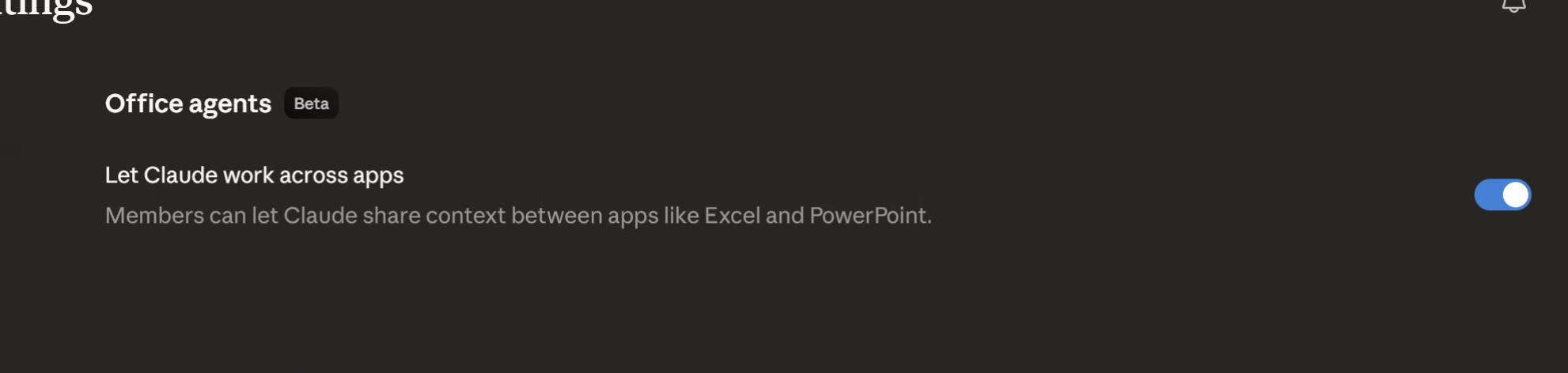
Anthropic shipped this on March 11, 2026, and the naming is sort of misleading. “Office Agents” sounds like Claude is roaming around your Microsoft 365 environment doing things autonomously. It isn’t. It’s cross-app context sharing - Claude maintains one thread of conversation while operating in two Office applications simultaneously. If you’ve been following which Claude mode to use, this sits squarely in the Cowork territory.
What the toggle actually enables
The core idea is dead simple. Before Office Agents, if you had Claude’s Excel add-in open and then switched to PowerPoint, you’d start a fresh conversation. Claude had no idea what you’d just been working on. Each add-in was its own island.
With the toggle on, one conversation spans both. Claude reads your live Excel data - formulas, ranges, named tables, the lot - and carries that context when you ask it to build something in PowerPoint.

Here’s a practical example. A financial analyst has a comp table in Excel - revenue multiples, margin analysis, deal terms for a dozen targets. They ask Claude to pull the top five by EV/EBITDA, explain the outliers, then switch to PowerPoint and say “build me three slides for the investment committee.” Claude already has the data, already knows the context, and generates slides with the actual numbers rather than placeholders.
That’s not a trivial workflow improvement. In building Tallyfy, I’ve watched financial teams spend hours manually copying data between spreadsheets and decks, reformatting as they go, catching errors on the third pass through. The thing is, most of them don’t know this toggle exists because Anthropic buried it in settings rather than making it a headline feature. The Decoder covered it and described it as “context sharing across apps,” which captures it well. TechRadar noted the efficiency gains but didn’t dig into limitations, which is where things get interesting.
One naming point is worth heading off before it causes confusion. Office Agents, the toggle described here, has almost nothing to do with Anthropic’s managed agents, despite the shared word. Office Agents is a consumer feature: a person flips it on and Claude carries context across two Office apps. Managed agents is a developer product, an API for running autonomous agents on cloud infrastructure, called by code rather than by an end user. I cover what managed agents actually is in a separate post. If you came here looking for the autonomous-agent product, that is the post you want. This one is about the Excel and PowerPoint toggle.
Skills are where the real value lives
The toggle itself is useful but limited to two apps. The bigger story is the Skills framework underneath it.
Anthropic published the Agent Skills open standard at agentskills.io on December 18, 2025. A skill is a folder with a SKILL.md file - YAML frontmatter for metadata plus Markdown instructions. That’s the whole format. No compiled code, no container, no deployment pipeline. Just text that teaches Claude how to do a specific type of work.
Why does this matter? Because the partner list is proper serious. Notion, Figma, Canva, Stripe, Atlassian, and Zapier are all building skills. Laravel and Vercel launched skill directories. The Agentic AI Foundation - which includes OpenAI and Block alongside Anthropic - now stewards MCP and will likely take on Skills governance too.
The clever bit is progressive disclosure. When Claude starts a conversation, it loads only the skill metadata - roughly 100 tokens per skill. The full definition only gets pulled in when the task actually needs it. If you’ve read about plugins, connectors, and skills, you know context overhead is the elephant in the room with any extension mechanism. Skills handle this better than any other extension model right now.
One-click reusable workflows are the end game here. A consulting firm builds a skill for due diligence report formatting. A sales team builds one for proposal generation from CRM data. A design team builds one that enforces brand guidelines when generating presentation content. Each skill works across any Claude surface that supports the standard.
Mind you, the partner integrations are still early. Most of the skill directories launched in Q1 2026 and the depth of available skills varies wildly by platform. But the standard is open, the format is simple, and the adoption curve looks like it’s accelerating.
Security gaps you need to know
Here’s where I stop being enthusiastic and start being blunt.
The Harmonic Security guide uncovered something that should give every security team pause: Cowork activity - including Office Agents - does not appear in Audit Logs, the Compliance API, or Data Exports. If Claude reads your entire financial model from Excel and generates a client-facing deck in PowerPoint, there’s no organizational record that it happened. For regulated workloads, that’s a non-starter. Full stop.
It gets worse. In January 2026, researchers demonstrated a file exfiltration attack through hidden prompt injection. A malicious instruction embedded in a document could trick Claude into extracting data from other files in its context. Anthropic says the success rate for prompt injection is around 1% even with mitigations, but 1% across thousands of daily interactions isn’t zero.
Then there’s the Skills supply chain problem. Snyk’s ToxicSkills audit found that 13.4% of publicly available skills had critical security vulnerabilities and 36.82% had at least one flaw. Skills can include executable scripts alongside the SKILL.md file, so a malicious skill doesn’t just shape Claude’s behavior - it can instruct Claude to run harmful commands. There’s no npm audit equivalent for skills. No automated scanning. You read the files and make a judgment call.
Consumer plan data retention runs up to five years if you let your chats train Claude. Five years of every conversation, every file Claude touched, every output it generated. If you’re doing anything remotely sensitive, that retention window should give you pause.
When consulting with companies on agentic AI use cases, I break this down into three security postures. Lockdown: disable Office Agents, no skills from external sources, no connectors beyond read-only internal tools. Controlled: enable Office Agents for specific teams with documented workflows, vet every skill manually, monitor usage through whatever logging you can cobble together outside Anthropic’s broken audit trail. Open: turn everything on and accept the risk. Most enterprise teams should be in Controlled right now. Nobody should be in Open for anything touching customer data, financial records, or regulated information.
Is the 1% injection rate acceptable? That depends on what’s in your Excel files.
How this compares to Copilot
The comparison everyone wants. Let me be straight - they’re solving different problems.

Claude’s approach is local-first. It reads files on your machine, operates through add-ins, and shares context across apps via the conversation thread. It has a 1M token context window - brilliant for large documents and complex analysis. Anthropic has dozens of connectors now, with the Skills connector library growing fast. File autonomy is excellent - Claude can read, analyze, and generate local files without needing them uploaded to a cloud service.
Copilot’s approach is organizationally native. It sits inside Microsoft Graph, which means it can pull from your email, calendar, Teams messages, SharePoint, and OneDrive as one connected context. If you ask Copilot to “summarize what happened on the Johnson account this week,” it can check emails, Teams chats, shared files, and meeting transcripts. Claude can’t do that. Not even close.
Data Science Dojo’s comparison highlights this gap well. Claude beats Copilot on reasoning depth and file-level work. Copilot beats Claude on organizational awareness and workflow integration.
(June 2026 note: the either-or split has blurred since I wrote this, so read the comparison as two products that now overlap rather than two camps. Microsoft 365 Copilot picked up its own agentic layer - Word and Excel agents went GA and there is a “Copilot Cowork” experience for longer multi-step work, per Microsoft’s March 2026 post. Copilot is also no longer OpenAI-only: Anthropic’s Claude now runs inside mainline Copilot chat through Microsoft’s Frontier program, which means you can get Claude’s reasoning with Copilot’s Graph context in one place. I dig into what that actually buys you separately. The decision is less “which vendor” and more “which surface”, but everything below about file autonomy and the audit-trail gap still holds.)
The adoption numbers tell their own story. Only 3.3% of M365 users pay for Copilot, which suggests the value proposition isn’t landing for most organizations yet. Claude’s cross-app context sharing through Office Agents is a direct play for that dissatisfied majority - people who want AI help in Office apps but don’t need or want the full Copilot stack.
In advisory work with mid-size companies, I’ve seen a pattern emerge. Teams that do heavy analytical work - financial modeling, data analysis, research synthesis - tend to prefer Claude’s depth. Teams that live in email and meetings and need organizational context tend to prefer Copilot. The messy middle, where most knowledge work actually happens, is where multi-agent complexity becomes a real consideration.
The tough sell for Claude is that the shared-context toggle only bridges two apps today. Excel and PowerPoint. There is a standalone Claude add-in for Word, but it does not yet ride the same cross-app conversation, and there is nothing for Outlook or Teams. Copilot works across the entire M365 suite. If Anthropic wants this to be more than a niche feature for analysts and consultants, they need to expand the app coverage considerably. And they need to fix the audit logging gap before any enterprise with a compliance team will take it seriously.
Who should enable it and who should wait
If your team regularly moves data between Excel and PowerPoint - financial analysts, consultants, business development, strategy teams - turn it on today. The workflow improvement is real and immediate. Pair it with a few vetted skills for running projects with Cowork and you’ll see real time savings.
If you’re in a regulated industry, if you need audit trails, or if your data governance policies require knowing exactly what AI touched which documents - wait. The security posture isn’t there yet. Anthropic knows this. The missing audit trail is the reason.
The thing is, this feature is a preview of where all AI-assisted work is heading. Not single-app chatbots. Not isolated copilots. Context-aware agents that move between tools the way humans do. Claude’s version is early, kind of rough around the edges, and missing critical enterprise controls. But the direction is spot on, and the Skills set of integrations underneath it could turn out to be the more important story.
Worth discussing for your situation? Reach out.