
Claude Chat, Cowork, and Code aren’t three competing products. They’re three interfaces to the same model, built for different types of work. I use all three every day and the transitions between them have become as natural as switching between email, Slack, and a spreadsheet. Most of the confusion comes from treating this as a pick-one decision when they’re meant to work together.
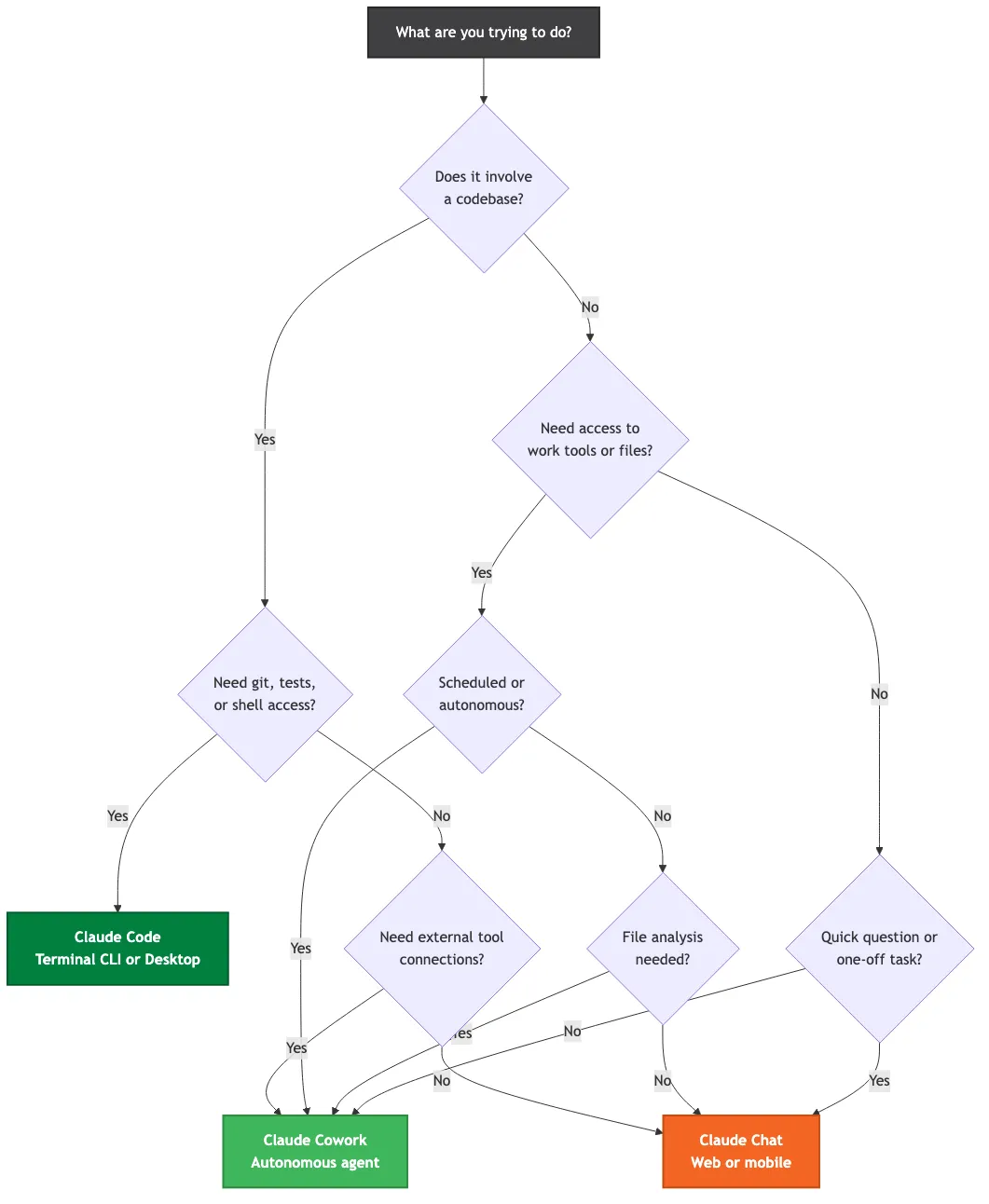
Here’s the shortest possible answer. Does your task involve a codebase? Code. Does it need access to work tools, files, or scheduled execution? Cowork. Is it a quick question or one-off text task? Chat. That decision tree covers about 90% of situations.
The remaining 10% is where it gets interesting.
The three modes are not competitors
Chat is what most people think of when they hear “Claude.” The conversational interface at claude.ai, available on web and mobile. You type a message, you get a response. No file system access beyond manual uploads. No tool connections. Persistent memory carries across conversations, with Projects for richer per-project context. Available on every plan, including free. It’s the front door.
Cowork is the one that changes the game for non-developers. Now a standard surface, Cowork is an autonomous agent that runs inside the Claude Desktop app on macOS and Windows. It connects to dozens of external tools through MCP connectors: Google Drive, Gmail, Slack, Notion, Figma, Asana, Jira, Salesforce, the list keeps growing. It runs code in an isolated sandbox. It accesses files you authorize on your local machine. Cowork also powers office agents for Excel and PowerPoint through shared conversation context. It has Projects with persistent memory across sessions. It also supports scheduled tasks and private plugin marketplaces for enterprise teams. This is the mode that finally gives knowledge workers what developers had with Code.
Code is the developer tool. Available as a terminal CLI or through the Desktop app’s Code mode. Full local codebase access. Git integration. Shell command execution. Visual diffs. Test running. Subagent orchestration for parallel work. Plan mode for read-only exploration. CLAUDE.md files as persistent project instructions. If you write software, this is the mode that fundamentally changes your workflow. On a corporate machine, setting Code up is more involved than the one-line install suggests.
Both Cowork and Code gained computer use capabilities in March 2026, meaning they can control your screen directly when their built-in tools don’t cover what you need. And Dispatch, the mobile companion, lets you assign tasks from your phone while Claude works on your desktop.
Here’s the feature comparison at a glance:
| Chat | Cowork | Code | |
|---|---|---|---|
| Interface | Web and mobile | Desktop app | Terminal or Desktop |
| File access | Upload only | Sandbox + connectors | Full filesystem |
| External tools | None | Dozens of MCP connectors | Shell + git |
| Memory | Cross-chat memory | Projects (persistent) | CLAUDE.md + auto-memory |
| Autonomous work | No | Yes (scheduled) | Yes (background tasks) |
| Computer use | No | Yes | Yes |
| Best for | Quick questions | Knowledge work | Engineering |
| Minimum plan | Free | Pro | Pro |
When to use which one
Forget the feature lists for a second. Think about what you’re doing right now.
You got an email from a partner asking about your pricing structure. You want to draft a quick reply. Chat. Takes 30 seconds on your phone.
You need to analyse three months of customer support tickets, cross-reference them with your product roadmap in Notion, and produce a report. Cowork. It connects to your ticketing system and Notion directly, runs the analysis autonomously, and produces the deliverable without you babysitting it.
You need to refactor the authentication module across 15 files, run the test suite, and commit the changes. Code. Full codebase awareness, git integration, test execution.
The overlap zones are real though. Cowork and Code both handle project management type work. Running entire projects with Code and Cowork together is a workflow pattern I’ve written about before. Code can do non-code work like organizing documents and writing reports. Cowork handles analysis that might involve running Python scripts in its sandbox.
The key differentiator: is the work codebase-anchored or tool-anchored? If you’re working within a repository with files that change under version control, Code is the right surface. If you’re working across multiple external tools and producing deliverables from their combined data, Cowork is where you want to be.

For enterprise IT teams evaluating this: these are not separate products requiring separate security reviews. One evaluation. One procurement. Same billing pool. Role-based access determines which modes each team uses.
Curious how this plays out for your team? Get in touch via Blue Sheen.
How they share the same brain
This is the part that matters for the architecture-minded reader.
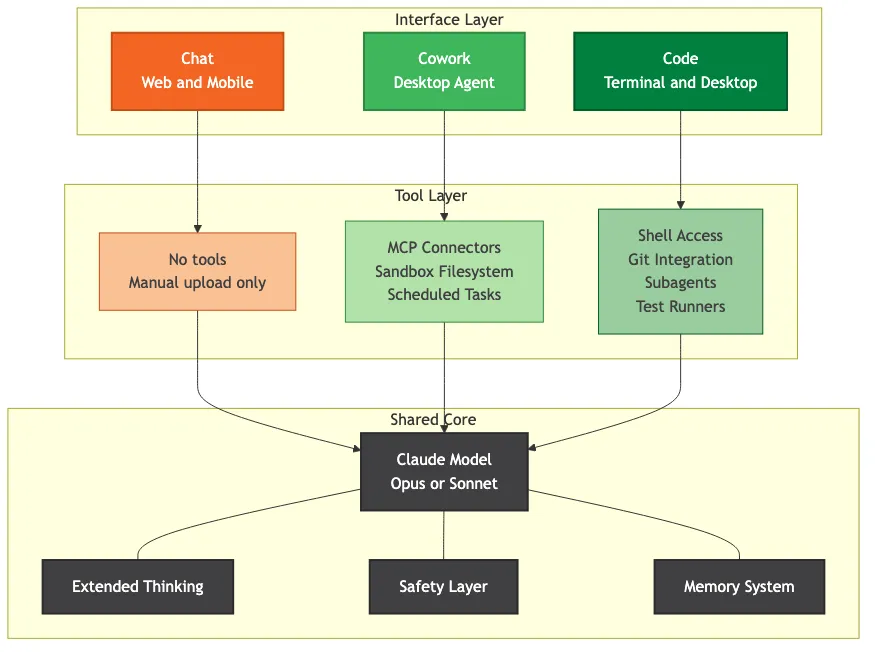
All three modes run the same Claude model. Opus or Sonnet, depending on your plan and selection. Same weights. Same adaptive thinking. Same safety layer. The intelligence is identical across surfaces. What changes is the tooling wrapped around that intelligence, and the tooling matters more than most people realize.
Think of it as one employee who can work at a desk (Chat), in a workshop with specialized equipment (Cowork), or in the machine room with full system access (Code). Same brain. Different equipment. The work they can do changes dramatically based on what tools they have at hand.
The relationship between the three is basically a set of concentric circles. Claude Code CLI contains Claude Code Desktop contains Cowork. The CLI has every capability. The Desktop GUI surfaces most of them visually. Cowork is scoped specifically to knowledge work patterns.
Chat sits outside this hierarchy because it’s deliberately minimal. No tools, no persistent state beyond Projects, no autonomous execution. That simplicity is a feature, not a limitation. For quick conversational work, you don’t want the overhead of a full agent system. You want answers.
Memory works differently across modes. Chat has cross-chat memory on every plan, with Projects available for deeper per-project context. Cowork has Projects with memory that accumulates across sessions, scheduled tasks that remember their context, and connector configurations that persist. Code has CLAUDE.md files that act as a persistent project brain plus auto-memory that builds over time. The pattern: each mode up the complexity ladder adds more persistent state.
If you want one source-of-truth instruction file to load consistently across all three surfaces, see how to deploy a single root CLAUDE.md across your organization. Each surface needs its own loader.
A realistic workday with all three
Let me walk through an actual Tuesday.
Morning commute, phone in hand. I open Claude Chat and talk through the agenda for a meeting later that day. Voice mode makes this fast. Sort of thinking out loud, but with a thinking partner who remembers the context from my last conversation about this topic. Three minutes, done.
I get a notification from Dispatch that a research task I assigned last night is finished. Cowork pulled data from three sources overnight, synthesized it, and left the results in my project. I skim the summary on my phone. Good enough. I’ll dig into it later.
Mid-morning at my desk. Cowork is open with a project that connects to our CRM data through the Salesforce connector. I ask it to prepare the weekly pipeline report. It pulls the data, runs the analysis, formats it in our standard template, and saves it to Google Drive. I review, make two edits, done. What used to take 90 minutes now takes 15.
If you’re trying to figure out which modes make sense for your team’s specific workflows, that’s exactly the kind of thing I help with.
Afternoon is Code time. I’m working on the Tallyfy codebase. Code has the full repository context, understands the architecture through CLAUDE.md instructions, and can run tests after every change. I’m refactoring a service module. Code creates a plan, I approve it, it executes across 8 files, runs the test suite, and shows me the results. The visual diffs make review straightforward.
End of day. I set up a scheduled Cowork task to monitor a competitor’s changelog overnight and summarize any interesting changes by morning. Quick voice note through Chat to capture a thought about tomorrow’s priorities.

The transitions are the key. Chat for mobile and voice. Cowork for tool-connected knowledge work. Code for anything touching a codebase. Nobody taught me this pattern. It emerged from using all three and finding where each one’s sweet spot lives.
What most companies get wrong
Four mistakes I see repeatedly.
Buying Code licenses for non-developers. Code is powerful but it’s terminal-native at its core. Your operations team, your sales team, your HR team, they need Cowork. Not Code. The interface matters. Giving a marketing manager a terminal-based tool is like handing them a power drill when they need a paintbrush. Same Claude brain, wrong surface.
Using only Chat and never graduating. This is the biggest one. Most teams start with Chat because it’s familiar and free. They stay there forever. They never discover that Cowork can connect to their actual work tools, run tasks autonomously, and maintain persistent project context. The difference between Chat and Cowork for knowledge work is like the difference between texting someone questions versus hiring them to work alongside you.
Treating them as separate products. I’ve seen procurement teams try to evaluate Chat, Cowork, and Code as three separate tools with three separate security reviews and three separate vendor assessments. That’s a painful waste of time. It’s one platform. One vendor. One data processing agreement. Organize your SharePoint and OneDrive properly once, and all three modes benefit from the same file access structure.
Not connecting external tools to Cowork. The MCP connectors are where the real power lives. Dozens of integrations sitting unused because nobody took the afternoon to set them up. Google Drive, Slack, Notion, Jira, GitHub, Salesforce, the connectors change Cowork from a smart chatbot into an actual autonomous colleague. Without them, you’re using maybe 30% of what Cowork can do.
The recommendation that works for operations teams I’ve talked to: start with Chat for everyone on the free tier. Understand the model. Get comfortable. Then add Cowork for operations, sales, finance, marketing, HR, and any knowledge worker whose job involves pulling information from multiple tools and producing deliverables. Add Code for engineering, DevOps, and anyone who works in a codebase. That sequence matters because each step builds on familiarity with the previous one.
Don’t overthink it. Chat for questions. Cowork for work. Code for code. Everything else is detail.