
Key takeaways
- Three tools, one cause - brew, mise and Claude Code each report a TCC denial in their own dialect, so the errors look unrelated when they arrive together.
- What
lsreports is irrelevant - TCC sits above POSIX. The folder readsdrwxr-xr-xand still returns EPERM. - Desktop and Downloads are the discriminator - both are TCC-protected too. If those work and Documents does not, you are looking at TCC and not at chmod.
- Your coding agent is its own TCC identity - Claude Code is Developer ID signed as
com.anthropic.claude-code. Granting Terminal does nothing for it. - Reset the decision, do not grant it -
tccutil resetclears the record so the next access re-prompts, which is why this needed no restart.
Three tools broke within a minute of each other, in a shell I had just opened.
Last login: Thu Aug 13 16:27:09 on ttys023
Error: The current working directory must be readable to amit to run brew.
mise WARN  Current directory does not exist or is not accessible: ~/Documents/GitHub

~/Documents/GitHub
> claude --dangerously-skip-permissions --effort max
error: An internal error occurred (EPERM)
Different tools, different wording, and the folder all three were complaining about was fine. ls -ld returned drwxr-xr-x, owned by me, group staff. Nothing had been chmodded, nothing deleted, nothing moved.
It took two wrong answers to get to the right one, and the wrong turns are the part worth reading. Everything below was measured on this machine on 13 August 2026: macOS 25.5.0, Terminal 470.2, Claude Code 2.1.231, against the tree at ~/Documents/GitHub holding 121 repositories.

Three errors, one minute apart
Read those three lines again and notice that not one of them says “permission”.
Homebrew says the working directory must be readable. mise says the directory does not exist or is not accessible, which bundles two different failures into one sentence and picks the wrong one first. Claude Code says EPERM, which is accurate and tells you nothing about what was denied or to whom.
Three vocabularies for one condition. If you meet any one of them alone you will go looking in the wrong place, and I know that because I did. The brew message in particular sends you straight at the folder, since it names readability and readability is what chmod controls.
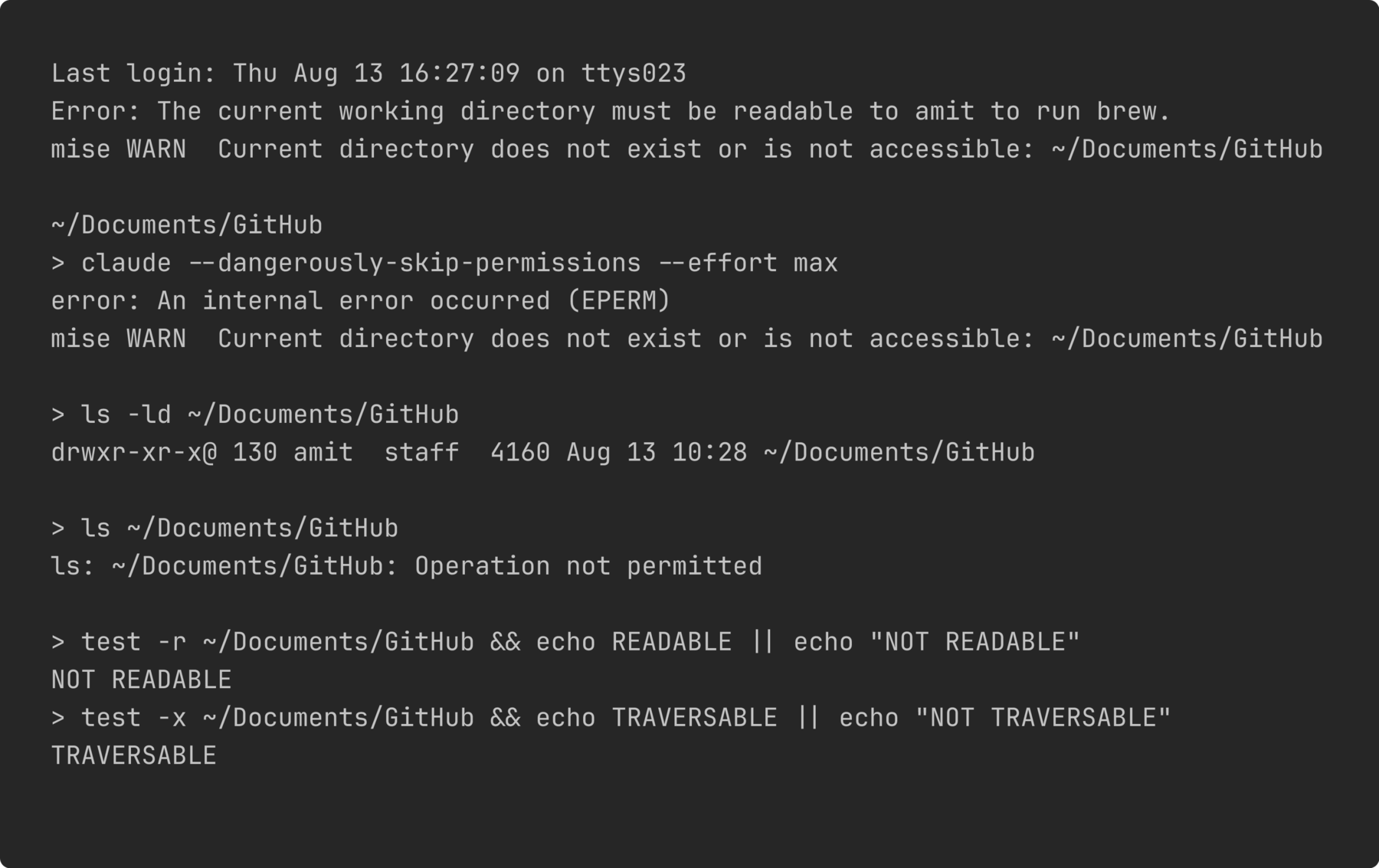
The whole symptom in one frame. Three tools, three phrasings, no mention of permissions from any of them, and a login banner two seconds earlier showing a perfectly ordinary shell.
The one thing they share is that all three inherit their working directory from the terminal, and all three try to read it before they do anything else. That is the only reason they fail in lockstep. A tool that never touches the current directory carries on fine, which is why the shell itself, and cd, and ls of anything outside that one folder, all kept working and made the whole thing look stranger than it was.
Why did the permissions look fine?
Because they were fine. TCC is not POSIX, and it does not write anything into the mode bits.
Transparency, Consent and Control is the macOS subsystem behind every “wants to access files in your Documents folder” dialog you have ever clicked. It sits above the filesystem and answers before POSIX gets a look in. So an ls -ld that reports drwxr-xr-x is telling the truth about the mode and telling you nothing about whether your process may open it.
Apple never documents TCC head-on for end users, but the service names leak out through the MDM privacy payload, which lists them one by one. SystemPolicyDocumentsFolder is the one covering ~/Documents, and it is the string you will need later.
The tell is a pair of results that cannot both come from chmod:
$ test -r ~/Documents/GitHub && echo READABLE || echo NOT READABLE
NOT READABLE
$ test -x ~/Documents/GitHub && echo TRAVERSABLE || echo NOT TRAVERSABLE
TRAVERSABLE
Not readable, but traversable, on a directory whose mode says r-x for everyone. No combination of ownership and mode bits produces that. Something above the filesystem is answering.
The confirmation takes one loop, and this is the check I would run first if it happened again:
~/            READABLE
~/Desktop     READABLE
~/Documents   NOT READABLE
~/Dropbox     READABLE
/tmp          READABLE
Desktop and Downloads are TCC-protected folders in exactly the same way Documents is. Both answered. Only Documents was denied. A broken TCC grant for the whole app would have taken all three down together, and a chmod accident would not have respected the boundary of a protected folder at all. One protected folder failing while its siblings pass is the signature, and it takes about four seconds to get.
ls on the folder confirms it in plain language, once you know to look at the wording rather than the failure:
$ ls ~/Documents/GitHub
ls: ~/Documents/GitHub: Operation not permitted
Operation not permitted is EPERM. A POSIX permission failure is Permission denied, which is EACCES. Those are different errors and macOS uses the first one for TCC. I have read past that distinction for years without registering it.
Two wrong answers before the right one
My first answer was that somebody had clicked “Don’t Allow”. It had the right shape. TCC decisions live in a SQLite database at ~/Library/Application Support/com.apple.TCC/TCC.db, and that file had been written at 12:43:50, sixty-four seconds after the last successful write into the tree. A deny record written one minute after normal operation is exactly what a mis-clicked dialog looks like.
I could not prove it, and I could not disprove it either, because reading that database needs the Full Disk Access which was the thing missing. So it stayed an inference and I said so. It is still the most likely explanation of the timestamp and it is still not evidence.
The second wrong answer arrived from somewhere else, which is what made it dangerous. Another session on this machine reported that Claude Code had auto-updated mid-session and the new build had no Documents permission. The install layout makes that sound obvious:
$ ls -l ~/.local/bin/claude
~/.local/bin/claude -> ~/.local/share/claude/versions/2.1.231

$ ls -lt ~/.local/share/claude/versions/
-rwxr-xr-x  303439136  Aug 13 09:40  2.1.231
-rwxr-xr-x  303439136  Aug 12 21:57  2.1.229
-rwxr-xr-x  298977312  Aug 11 20:33  2.1.228
Every version is a separate 300 MB binary at its own path, and the symlink had been flipped to 2.1.231 at 15:37 that afternoon. New path, no grant. I believed it for about a minute, and I would have published it.
Two pieces of evidence killed it. The first is the code signature:
$ codesign -dv --verbose=2 ~/.local/share/claude/ClaudeCode.app
Identifier=com.anthropic.claude-code
TeamIdentifier=Q6L2SF6YDW

$ codesign -dv --verbose=2 ~/.local/share/claude/versions/2.1.231
Identifier=com.anthropic.claude-code
TeamIdentifier=Q6L2SF6YDW
Same identifier, same team, for the app wrapper and for the versioned binary. TCC keys grants to the signing identity of a Developer ID binary, not to its path on disk, so moving to a new versioned file does not lose anything. The theory required a mechanism that does not exist.
The second is the clock, and it is the simpler refutation of the two. The denial was written at 12:43:50. The symlink moved at 15:37. The record predates the update by about three hours, so the update cannot have caused it in either direction.
That is two plausible explanations dead, and I want to be plain about where that leaves the timestamp: I do not know what wrote that TCC record at 12:43:50. No dialog was reported, no update had happened yet, and the database that would say is the one I could not read. I am recording it as unexplained rather than reaching for a third theory, because the third theory would have been just as tidy as the first two.
What survived is the part that matters, and it is a fact about how TCC sees the tools rather than a story about what went wrong.
Reset the decision, do not grant it
Terminal and Claude Code are separate TCC identities. com.apple.Terminal is what brew and mise run under, because they are ordinary child processes of the shell. Claude Code is a Developer ID signed binary with its own identifier, com.anthropic.claude-code, and TCC treats it as its own applicant rather than as a child of whatever launched it.
So there are two grants to repair, not one, and fixing either alone leaves you looking at a half-broken machine. That is exactly what happened here: resetting Terminal brought brew and mise back and left claude dead, which for a couple of minutes read as the fix having failed.
Here is the sequence that worked.
Confirm it is TCC rather than a filesystem problem. Run the sibling check above. If
~/Desktopand~/Downloadsanswer and~/Documentsdoes not, carry on. If all three fail, this is not your bug. Do not skip this step and reset anyway.tccutil resetclears the decision in both directions, so on a machine that is working it takes away a grant you wanted to keep.Reset the terminal’s decision:
$ tccutil reset SystemPolicyDocumentsFolder com.apple.Terminal
Successfully reset SystemPolicyDocumentsFolder approval status for com.apple.Terminal
Reset the agent’s decision, separately:
$ tccutil reset SystemPolicyDocumentsFolder com.anthropic.claude-code
Successfully reset SystemPolicyDocumentsFolder approval status for com.anthropic.claude-code
Successfully reset SystemPolicyDocumentsFolder approval status for com.anthropic.claude-code
Two success lines is correct and not a stutter.
tccutilprints one per record it clears, and there were two registered binaries under that identifier.Touch the folder again to trigger a fresh prompt, and allow it. A plain
lsis enough.Verify both halves, because step 2 alone looks like a working fix from inside a terminal:
$ ls ~/Documents/GitHub | wc -l
     121
$ claude --version
2.1.231
If you use iTerm, Ghostty, WezTerm or VS Code’s integrated terminal, substitute its bundle identifier for com.apple.Terminal. The agent line does not change.
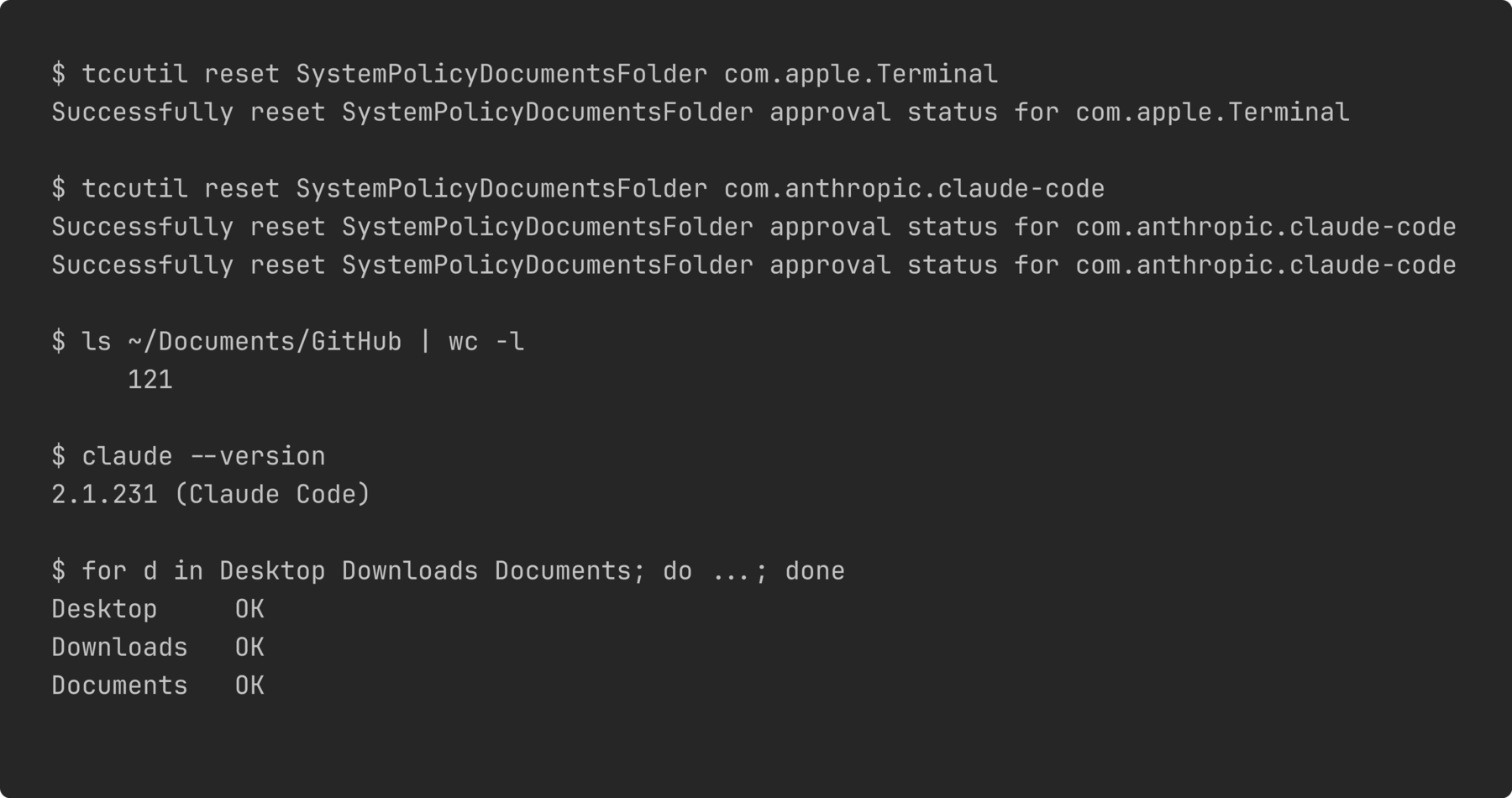
Both resets and both verifications. The doubled success line on the second reset is one record per registered binary, and 121 against 2.1.231 is the pair that proves the two identities were repaired independently.
Every write-up I found on this ends with “quit the app and reopen it”. That was not needed, and the reason is worth carrying: tccutil reset clears the stored decision rather than recording an approval. With no decision on file, the next access is evaluated from scratch and the prompt appears immediately, in the running process. If you instead flip a switch in System Settings you are writing a new record, and a process that already holds a denial keeps holding it until it restarts. The reset path is both the smaller change and the faster one.
Two things I would do differently next time. I would run the sibling-folder check before reading anything else, because it costs four seconds and it eliminates the entire chmod branch. And I would treat the second theory the way I eventually did rather than the way I first did: it arrived from a source I trusted, it fit the evidence I had in front of me, and it took a codesign call and a glance at two timestamps to fall over. A confident explanation from elsewhere still has to survive the same tests as one of your own.
The general version of this is not about macOS. It is that a permission layer nobody names in an error message will send three tools into three unrelated-looking failures, and the fastest route out is a check that separates the layers rather than a check that goes deeper into one of them. I hit the same shape from a different direction when a worktree cleanup probe returned its permissive answer while broken, and again when a check that had passed for months turned out never to have run. The failure is the same each time. The thing you tested and the thing that runs were not the same thing.