
Quick answers
What is /loop for? Rerunning a prompt every few minutes while you watch, like checking a deploy until it goes green or red.
Does it survive a closed terminal? No. It lives in the session and dies with it, and even a recurring loop expires after seven days.
What about that durable flag? On 2.1.185 it still reported the job as session-only and wrote nothing to disk. Do not lean on it for persistence.
Type /loop 5m check the deploy and Claude reruns that prompt every five minutes until you stop it. That is the whole feature, and it is properly handy. The catch is what happens the second you close the terminal: nothing. The loop was never a scheduled task in the operating-system sense. It is a timer the Claude Code process checks while it is alive, and when the process goes, the timer goes with it.
So one question sorts every use of /loop. Will you be sitting here, with this session open, the whole time the job needs to run? If yes, /loop is the lightest tool you have, and you should reach for it. If no, you want something else, and using /loop anyway is the most common way a job you thought was scheduled quietly never runs.

What loop actually does
/loop is a bundled skill, and under the hood it writes a cron expression and schedules the prompt to fire on that interval. A 5m becomes every five minutes, a 2h becomes every two hours, and a session can hold up to 50 of these at once. When you create one, the scheduler tells you exactly what it set up and, more usefully, what it did not:
Scheduled recurring job f7ab3eda (Every 5 minutes). Session-only
(not written to disk, dies when Claude exits). Auto-expires after
7 days. Use CronDelete to cancel sooner.
Three facts hide in that one line, and they decide everything about where /loop belongs. It is session-only, so closing the terminal stops it. It auto-expires after seven days, so even a loop you babysit carefully is living on a clock. And it fires only while the session is idle: the official scheduled-tasks docs are blunt that tasks “only fire while Claude Code is running and idle,” and that a fire missed while Claude is busy runs “once when Claude becomes idle, not once per missed interval.” No backlog. No catch-up. That is the right behaviour for live polling and the wrong behaviour for anything unattended, which is the whole point.
The jobs it is built for
Picture the work /loop was made for. You push a deploy and you want to know the moment it flips green or red, without babysitting the dashboard yourself. You set /loop 5m check the deploy status and tell me when it changes, you carry on with something else in the same window, and each run scrolls past. When it finishes, you close the terminal and the loop is gone with it. Nothing to clean up. The fact that it dies with the session is the feature here, not a flaw.
The same shape fits a handful of everyday jobs. Watching a long test suite and pinging you on the first failure. Polling a pull request for review comments while you work on the next thing. Re-checking a flaky external service every few minutes during an incident. Every one of these has you present, the session open because you opened it, and a natural end when you walk away. That is /loop at its best: cheap to set up, visible while it runs, and self-cleaning.
It goes wrong the instant you stretch it past that shape. Set a /loop to “post a daily summary at 9am,” close the terminal at the end of the day like any sane person would, and the 9am run just does not happen. The process that held it is gone. Treat /loop as a tool with a short, deliberate life: the next hour, the next afternoon, while you are around. The moment a job needs to outlive your attention, this is not the tool, and pretending otherwise is how you get burned.
The durable flag that does not
Here is the part nobody mentions, and it is a small trap worth stepping around. The scheduling tooling exposes a durable option, and the schema describing it promises that a durable job persists to ~/.claude/scheduled_tasks.json and survives restarts. Brilliant, you think. Set that and my loop outlives the session. I went to check, because a promise like that is too good to take on faith.
It does not hold. On Claude Code 2.1.185, I created a job with durable: true and the scheduler labelled it session-only anyway:
f7ab3eda - Every 5 minutes (recurring) [session-only]:
Check the deploy status and tell me the moment it goes green or red.
That [session-only] tag is the tell. With that durable job live in the session, I checked the disk for the file it was supposed to have written:
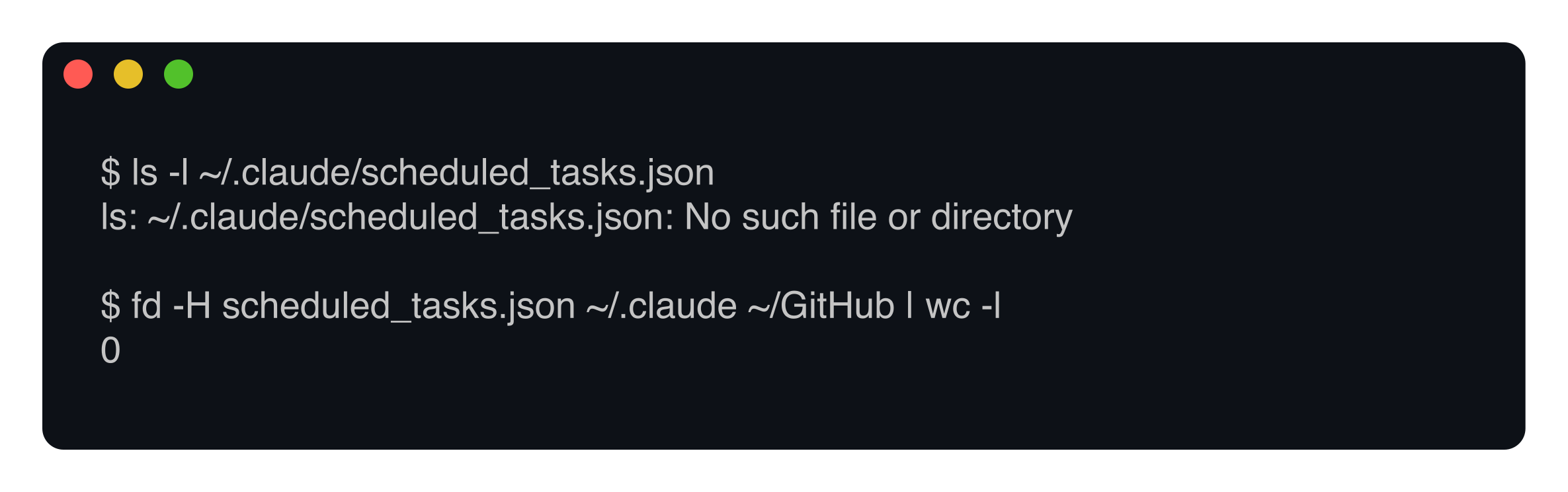
No scheduled_tasks.json, anywhere. Zero files. The durable flag is in the tooling, but on this build it changed nothing: the job stayed in memory and the disk stayed empty. The public docs back this up by omission, by the way. They only ever promise session-scoped tasks, a seven-day expiry, and restoration through --resume. They say nothing about durable on-disk persistence, so the safe reading is that there is none to rely on yet. Do not build a habit on a flag that quietly no-ops. If you want a Claude job that actually survives a closed laptop, that is a job for launchd on your own machine, not for a durable scheduled task.
The minute you pick matters
This one is a no-brainer once you see it, and almost nobody does. When you ask for “every morning at 9,” you get 0 9 in cron terms. So does every other person on the planet who asked for the same thing. The scheduler is blunt about the consequence in its own guidance: “every user who asks for 9am gets 0 9… which means requests from across the planet land on the API at the same instant.” A wall of jobs, all firing on the same tick.
The fix is almost free. Nudge the job off the obvious marks. Ask for 3 9 or 57 8 instead of 0 9, 7 past the hour instead of on the hour, and you step out of the crowd. The scheduler already helps, adding a small deterministic jitter on top of whatever you pick, but choosing an off-minute yourself is the bigger lever. I do the same thing with my own machine automation: the LaunchAgent that pulls my repos runs at seventeen minutes past, never on the hour, for exactly this reason. It costs nothing and it spares the shared service a needless spike. Mind you, this only matters for recurring jobs on round times; a one-off you fire by hand can land wherever it likes.
When to stop using loop
The clearest way to think about /loop is as the bottom rung of a ladder. It depends on a session, a session depends on an app, and an app depends on a powered machine. Each step up removes one of those fragile things. So the question is never “how do I schedule this.” It is “how many of my own fragile things am I willing to let this job lean on.” The more a job matters, the fewer it should touch.
If a job has to run while you are at lunch, asleep, or on a plane, /loop cannot help and neither can any in-session trick. Move it off the terminal for good. For work that has to touch your actual machine, your local files, or your git credentials, the answer is a launchd job running on your Mac. For work that has to run whether or not your laptop is even on, the answer is a cloud routine. I laid out how the three schedulers really differ in a separate piece, and the wrapper for unattended local runs, the non-interactive claude -p command, in another.
Related reading
Scheduling Claude on your own machine covers the launchd and cron side. How Claude Code scheduled jobs really work compares the in-session, Desktop, and cloud options head to head.
None of this makes /loop lesser. It is the right tool for a real job: the work you are watching, right now, for a bounded stretch of time. Use it for that and it is spot on. Ask it to outlive the window it runs in, and you have picked the wrong rung. The skill is not learning a clever flag. It is matching the scheduler to how long the job has to survive without you in the room.