Key takeaways
- A stop hook fires when Claude finishes a turn - and it can refuse to let the turn end
- Exit code 2 is the whole game - exit 2 blocks; exit 1 is treated as a non-blocking error and ignored
- The stop_hook_active flag stops infinite loops - check it, or your gate will jam shut forever
- Test-gating and lint-gating are the high-value patterns - block the turn until the suite is green
I had a hook problem before I had a hook. Claude Code would finish a long task, announce that it was done, and stop. Then I would check the files and find that three steps of a twelve-step plan were missing. No error. No warning. Just gone.
The fix was not a cleverer prompt. It was a short bash script that physically would not let Claude stop until it had verified its own work. That script is a stop hook, and the stop hook is the single most useful hook event in Claude Code, because it is the only one that inverts control. Every other hook reacts to something Claude did. A stop hook decides whether Claude is allowed to be finished at all.
This post is the general guide to that mechanism: what a stop hook is, the exit code that makes it work, the trap that turns it into an infinite loop, and the handful of patterns worth wiring up. For the deep, specific story of using one to enforce plan completion, I wrote that up separately in how to ensure Claude follows a plan. This is the layer underneath it.
What a Stop hook is
A hook is a script Claude Code runs automatically at a defined moment. If you are new to the idea, what a hook is covers the whole family. The Stop event is one specific moment in that family: the official hooks documentation lists it plainly as firing “when Claude finishes responding.” Your script runs in the gap between Claude believing it is done and the turn actually ending.
What makes the Stop hook different from every other hook is the direction of authority. A PostToolUse hook runs after an edit and can comment on it, but the edit already happened. A PreToolUse hook can block a single tool call. The Stop hook blocks the act of finishing. When your script signals a block, Claude does not get to stop. It is told to keep working, with your reason as the instruction. You have inverted the normal arrangement, where Claude decides it is done and you find out afterward. Now Claude has to ask, every single turn, and your script answers. That is the entire value of a Stop hook, and it is why it is worth understanding properly rather than copying a snippet and hoping. A gate that you do not understand is a gate that will eventually lock you out instead of locking the problem in.
The script itself is small. It receives a JSON payload on standard input describing the session, it does whatever check you care about, and it communicates its verdict back through an exit code and optionally some JSON. The check can be anything a shell can express: run the tests, run the linter, grep the transcript, call an API. The Stop hook does not care what you verify. It only cares whether you say yes or no.
Exit code 2 is everything
Here is the detail that breaks more stop hooks than any other, and it is worth getting exactly right. A hook signals its verdict through its exit code, and the exit codes do not mean what a shell programmer expects.
Exit 0 means success. Claude Code reads the script’s standard output for JSON instructions and proceeds. Exit 2 means a blocking error: for a Stop hook, it “prevents Claude from stopping, continues the conversation.” Every other exit code, including 1, is a non-blocking error. The script is considered to have failed, a hook-error notice appears in the transcript, and Claude carries on stopping anyway. The official documentation states the trap directly:
“For most hook events, only exit code 2 blocks the action. Claude Code treats exit code 1 as a non-blocking error and proceeds with the action, even though 1 is the conventional Unix failure code.” — Claude Code hooks documentation
Read that twice if you write shell scripts for a living, because the instinct is wrong here. In a normal script, exit 1 is how you say “this failed.” In a Stop hook, exit 1 is how you say “this failed, ignore me, let Claude stop.” If your gate logic ends in exit 1 when the check fails, the gate does nothing. It logs an error and waves Claude through. The block only happens on exit 2.
The JSON output is the easy part. To block, the script prints {"decision": "block", "reason": "..."} to standard output, and the reason is the text Claude receives as its instruction to keep going. To allow, you omit the decision field, or just exit 0 with no output at all. A precise, useful reason matters more than it looks. The reason is not an error message for a human to read. It is the next prompt Claude acts on, so “tests failing” is weak and “the auth test suite has 3 failures, fix them before finishing” is strong.
Stop, SubagentStop, and loops
Two things commonly surprise people once their first stop hook works.
The first is that there is a sibling event. SubagentStop is a separate hook that fires when a subagent finishes, distinct from the Stop that fires when your main turn finishes. If you want to gate the work that subagents do, Stop will not catch it, because a subagent finishing is not your session finishing. You need SubagentStop for that. Most people only need Stop, but knowing the split exists saves a confused afternoon.
The second is the infinite loop, and it is the one real danger of stop hooks. Picture the failure. Your hook blocks Claude from stopping. Claude does a little more work and tries to stop again. Your hook runs again, sees the same unsatisfied condition, and blocks again. Claude can never finish. The session is wedged shut.
Claude Code gives you the tool to prevent this, but you have to use it. The JSON payload your script receives on standard input includes a stop_hook_active flag. It is true when the current stop is already happening because a previous stop hook blocked. If stop_hook_active is true, your hook must not block again. Check the flag near the top of the script and exit 0 the moment you see it set. A stop hook that does not check stop_hook_active is not a finished stop hook. It is a trap with a timer on it. If you are wiring this kind of enforcement into a team’s workflow and want a second pair of eyes before it goes wrong, Blue Sheen runs engagements like this.
Patterns worth wiring up
A stop hook is a blank gate. Its value comes only from what you make it check. Three patterns earn their place.
Test-gating is the highest-value one. The hook runs your test suite and blocks the turn until it passes. The whole script is short:
#!/bin/bash
# Stop hook: do not let the turn end while tests are red
if npm test --silent >/dev/null 2>&1; then
  exit 0
fi
echo '{"decision": "block", "reason": "The test suite is failing. Fix it before finishing."}'
exit 2
That is a complete, working stop hook. Lint-gating is the same shape with the linter in place of the tests, and it catches the smaller class of problems that tests miss. Plan-verification is the third pattern, the natural partner to disciplined plan-mode work, and it is the one I actually run every day. My stop hook checks that if a session touched a plan file, the response includes a written completion check before Claude is allowed to stop. The full script, the six bugs I found building it, and the regression tests are all in the plan-following deep dive, so I will not repeat them here. The point for this post is only that plan-verification is a stop hook like any other: a check, an exit code, a reason.
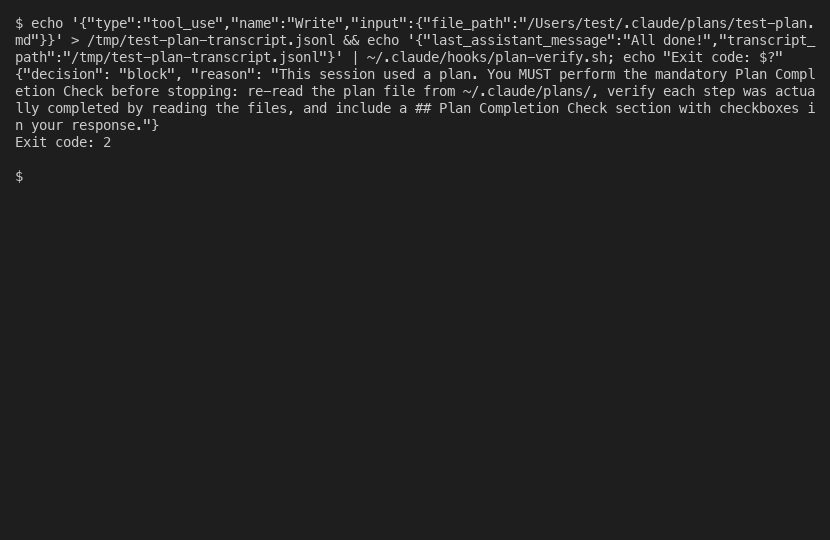
Notice what these three have in common. They are all deterministic. A written CLAUDE.md instruction to “always run the tests” is advice, and advice fades from context in a long session. A stop hook is a separate process that runs every turn regardless of what Claude remembers. That is the reason to reach for a hook instead of a prompt. The hook is not the clever option. It is the one that runs every turn regardless of what Claude remembers.
Debugging a Stop hook
When a stop hook misbehaves, it usually fails in one of three ways, and all three are quick to recognize.
It does nothing. The check runs, the condition fails, and Claude stops anyway. Almost always this is the exit code: the failure path ends in exit 1 instead of exit 2, so Claude Code treats it as a broken hook and proceeds. Change the block path to exit 2.
It never lets go. Claude is stuck, blocked over and over, unable to finish. This is the missing stop_hook_active check. Add the guard that exits 0 when the flag is set.
It blocks on the wrong thing. The hook fires when it should not, because the condition is too broad. A stop hook sees every turn, so a check written for one situation will run against all of them. Scope the condition tightly, and use the permission_mode field in the input payload to skip turns where the check does not apply, such as planning turns. One more practical note: the default timeout for a command stop hook is generous, 600 seconds, but you can and often should set a short explicit timeout in your settings so a slow check fails fast instead of hanging the session.
A stop hook is a small thing, fifteen to sixty lines of shell, but it is load-bearing. It runs on every turn, and a bug in it does not produce a wrong answer, it produces a stuck session or a silent pass. So treat it like the gate it is. Test it deliberately before you trust it, give it a real condition and a clear reason, and check the flag that keeps it from locking you out. Get those right and you have the one thing a prompt can never give you: a rule Claude cannot talk its way past.