
Last year I wrote the optimistic guide to Claude Projects for teams. I still stand by what is in it. Projects as shared working memory, prompts that replace stale documentation, faster onboarding, all of that holds. But that post covered the upside, and a fair guide owes you the other side too. This is the other side.
Here is the contrarian claim: for serious team collaboration, Claude Projects is the wrong default, and a git-backed fileshare driven by Claude Code beats it. Not because Projects is bad. Because Projects is missing the one thing team collaboration is actually built on, which is version control. A team’s shared knowledge is not a static pile of files. It changes constantly, and the value is in being able to see how it changed, who changed it, and to undo a change that turned out wrong. Projects gives you none of that. Git gives you all of it, for free, and has for two decades.
The rest of this post is the proof, and then the part that matters most: this is not a blanket verdict. Projects is fine for one person. It is teams, specifically, where the gap bites.
Where Projects shines, and where it stops
Start with credit, because Projects earns it. A Claude Project is a workspace with three parts: a knowledge base of files you upload, custom instructions, and the chat history that accumulates inside it. Anthropic gives it a large context window, and when the knowledge outgrows that, retrieval kicks in to extend the reach. For a defined body of context that a team queries often, the API conventions, the deployment steps, the architecture decisions, that is a real improvement over everyone keeping private notes. The optimistic post made that case and the case is sound. Where Projects stops is the moment that body of knowledge starts to change at team speed. A workspace built for accumulating chats and uploaded files is built for adding. It is not built for the harder thing a team needs, which is managing change to a shared artifact over time, with many hands on it.
The distinction is between a tool for adding and a tool for managing change, and it is easy to miss until a team is mid-flight. Early on, a Project just grows: someone uploads the onboarding doc, someone adds the deployment notes, the knowledge base gets richer and everyone is happy. The trouble starts later, when the deployment notes are wrong and need correcting, or when two people disagree about a coding standard, or when last quarter’s architecture decision gets reversed. Adding was easy. Changing, safely, with a record, is the part Projects was never designed to do, and changing is most of what a living team knowledge base actually involves.
How fast is team speed? Faster than most people picture when they set a Project up. A coding standard gets revised after a retro. A runbook gets corrected the day after an incident. An onboarding note goes stale the moment a tool is swapped. An active knowledge base for a working team changes most weeks, sometimes most days, and each of those changes is a small decision that someone might later need to question. A store that records only the current state, and silently overwrites everything before it, treats every one of those decisions as if it never had a history. For a reference library that is acceptable. For a team’s operating knowledge it throws away exactly the information a team most often needs.
Projects has no version control
This is the gap, and it is worth being exact about it. Claude Projects has no version control. There is no diff, so when a knowledge file changes you cannot see what changed. There is no history, so you cannot tell who changed it or when, or read the state it was in last month. There is no branch, so two people cannot work on a revision in parallel and merge it. There is no rollback, so a bad edit to a shared instruction is just the new reality until someone notices and retypes the old version from memory. None of this is a Claude failing; it is just not what a Projects workspace is for. But every one of those four, diff, history, branching, rollback, is something a team relies on without thinking, because a team’s shared knowledge is a living document, and living documents need a record of their own life.
Picture the smallest version of the problem. A team’s Project holds a knowledge file with the deployment procedure. Someone edits it, in good faith, and gets a step subtly wrong. For the next three weeks, every developer who asks Claude how to deploy gets the subtly wrong answer, with full confidence, because the model is faithfully reading the knowledge it was given. Nobody can see that the file changed, nobody can see what it said before, and when the error is finally caught, the fix is someone trying to remember the correct step. In a git repository that same mistake is a one-line diff, caught in review or reverted in seconds. That is the gap, made small and concrete.
Two of the four missing pieces deserve a closer look, because teams feel them most. The first is accountability. When a shared instruction is wrong, the first useful question is who wrote it and what were they looking at, because that is how you fix the cause and not just the symptom. Projects cannot answer it; git answers it with one blame command. The second is parallel work. On a real team, two people will want to revise the same knowledge in the same week. Git expects that, branches for it, and merges the results. A Projects knowledge base has one live copy, so two simultaneous editors are a race, and the slower save quietly wins by erasing the faster one. Neither of those is an edge case. Both are just Tuesday on a team.
The knowledge gets locked in
There is a second cost, quieter than the first. Knowledge you put into a Claude Project is not easy to get back out. There is no clean package-export, no single button that hands you your knowledge base, your instructions, and your accumulated chats as files you own. Getting it out takes deliberate workarounds. For a solo user that is a minor annoyance. For a team it is something heavier: a team that commits months of shared context to Projects has put its institutional memory somewhere it cannot trivially leave, and any knowledge store you cannot leave is a knowledge store that has quietly become a dependency.
The two costs compound in a particular way. No history means you cannot audit the past; no clean export means you cannot fully take the present with you. A team that has lived in Projects for a year therefore has a knowledge base it can neither look back through nor cleanly move, and both of those become apparent at the same bad moment, usually when something has gone wrong and someone asks a question the workspace cannot answer. A git repository has neither problem, and it has neither problem for free.
There is a continuity angle worth naming too. People leave teams. When the person who built and curated a Project moves on, what they leave behind is a workspace with no history of their reasoning, only its final state, and a body of knowledge nobody else can cleanly extract and re-home. The institutional memory walks out with a thin handover. A git repository hands the next person the opposite: every change with its message, the full record of why the knowledge looks the way it does, and a clone command that moves the whole thing in one step. Continuity is a team property, and it is one more thing version control delivers as a side effect of how it already works.
The git fileshare alternative
The alternative is older and plainer than Projects, and that is the point. Put the team’s shared knowledge in a git repository, as plain Markdown files, and drive it with Claude Code rather than the Projects UI. A CLAUDE.md file at the root carries the instructions and context that Projects would hold as custom instructions; the other files carry the knowledge. Claude Code reads all of it on every session. What you gain is everything the previous two sections said Projects lacks. Git gives you the diff, the history, the branches, the rollback, decades-proven and free. Pull requests give you review, so a change to shared knowledge gets a second pair of eyes before it lands. And the repository is yours, on infrastructure you choose, exportable by definition because it was never locked in. The knowledge base becomes a normal engineering artifact, governed the way every other important shared file already is.

What does that repository actually look like? Plainer than people expect. A CLAUDE.md at the root for the instructions and the map of everything else. A handful of Markdown files for the real knowledge, a deployment runbook and a coding-standards file and whatever else the team leans on, each one its own file. Maybe a folder per domain once it grows. That is the whole structure, and its plainness is a feature: there is nothing to learn that the team does not already know, because it is Markdown in git, the same Markdown in the same git they use for code. The knowledge base stops being a special system with its own rules and becomes one more directory in a repository, reviewed and versioned like everything else in it.
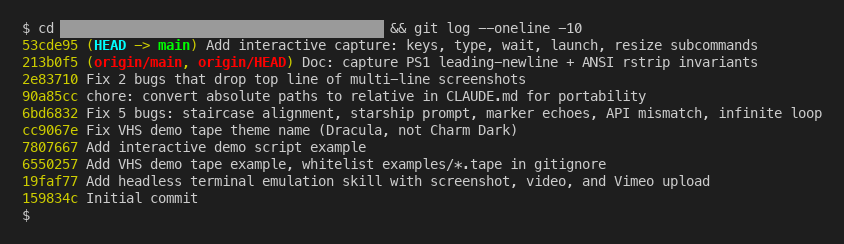
This is not a hypothetical setup. Running a team’s work through Claude Code on a shared repository is a pattern teams use now, and for instructions that should reach every Claude session company-wide rather than one repo, organization-wide CLAUDE.md propagation is the layer above it. The cost of the git approach is real and small: it asks the team to be comfortable with a repository and a pull request, which an engineering team already is, and which a non-technical team will find less familiar than the Projects UI. That is the real tradeoff, and it is a tradeoff about the team, not the tool. Designing the structure, what lives in CLAUDE.md and how the knowledge files are organized and who reviews changes, is worth doing deliberately. Blue Sheen helps teams set that up.
It is fair to ask what the git approach gives up, because Projects did some things well. Two, mainly. The Projects UI needs no git literacy, so a non-technical team can use it the day it is shown to them. And Projects handles its own context management, sliding into retrieval automatically as the knowledge grows, where a git-plus-Claude-Code setup leaves context discipline to you. Both are real losses. Neither outweighs version control for a team actively editing knowledge that matters, because the UI convenience saves minutes while a missing history costs hours at the worst possible time. But they are the real reason the answer is not unanimous, and the reason the next section splits the verdict rather than declaring one.
Solo is fine, teams are different
The verdict has to be split, because the real answer turns on one word, team. For one person, Claude Projects is fine, and often better than a repository. A solo user is the only one editing the knowledge, so there is no merge to manage, no review to run, no question of who changed what, because the answer is always you. Version control solves coordination problems, and one person has no coordination problem. The Projects UI is faster to set up than a repo, and for solo work that speed is a clean win with no hidden cost. The moment a second person can edit the shared knowledge, that changes. Now there is change to track and conflicting edits to reconcile, and bad edits that someone other than the author has to be able to find and undo. That is the exact problem version control was invented for, and it is the exact problem Projects does not address.
The hard case sits in the middle, the small team of two or three. Strictly, the moment a second editor exists, the version-control argument applies. In practice, a team that small can sometimes hold the coordination in their heads: they talk daily, they know who touched what, an overwrite gets noticed within hours. For them Projects can work for a while. But it works by everyone carrying the version control in memory, and memory is the thing that fails first, and it fails as the team grows and the knowledge base gets too large for any one person to hold all of it. The small team is not an exception to the rule. It is the rule on borrowed time.
So the rule is short. Solo, or a tiny team treating knowledge as read-mostly: Projects is fine, use it. A real team, actively editing shared knowledge that matters: put it in git, drive it with Claude Code, and treat it as the engineering artifact it is. I wrote the optimistic guide because the optimism is warranted for the case it described. This post exists because that case is narrower than it looked, and the line is not company size or how technical the team is. It is whether more than one person edits the knowledge. Cross that line and the missing version control stops being a footnote and becomes the whole story.